How AI Workflow Automation Actually Works Inside Restoration Operations
AI workflow automation in restoration isn't about chatbots. It's about data moving between systems without manual re-entry. Here's the architecture, the platform paths, and why clarity has to come first.
AI workflow automation in restoration connects job management, estimating, documentation, and accounting into a single operational layer, so profitability is visible in real time and nothing falls through the gaps between systems.
At a Glance
Most restoration companies aren't failing at the work. They're failing at the handoffs; the gaps between systems where job data gets lost, re-entered, or never captured at all. AI workflow automation addresses this by connecting the platforms your operation already runs on, creating a data layer that moves information where it needs to go without someone manually carrying it. The result is operational visibility that most restoration owners have never had: live margin by job type, documentation status in real time, and AR aging without a spreadsheet. Getting there requires understanding the architecture before choosing the tools because the wrong build sequence turns an integration project into a maintenance burden that outlasts the problem it was supposed to fix.
Most restoration companies running between $2M and $10M in annual revenue share a common problem: they have more software than they have visibility.
Job management lives in one platform. Estimates get built in another. Field documentation happens in a third. Accounting sits in QuickBooks, largely disconnected from all of it. And somewhere in the gaps between those systems, margin leaks out quietly, through unbilled equipment days, missed line items, scope rewrites that should have been caught at intake, and job costs that don't surface until the work is already done.
That's what this post covers. Not which software to buy, that depends on what you're already running and what your team can realistically adopt. But the architecture underneath the decision: what a connected restoration operation is built from, how data actually moves through it, and what you gain when the pieces work together. Understanding that architecture, what workflow clarity work is designed to produce, is what makes any platform decision a sound one rather than a lateral move.
The Problem Isn't the Tools. It's the Gaps Between Them.
Most restoration companies that struggle with operational visibility aren't under-tooled. They're running five, six, sometimes ten platforms simultaneously, a job management system, an estimating platform, a field documentation app, a CRM, QuickBooks, and a handful of spreadsheets filling in wherever the integrations fall short.
The tools exist. The data exists. What doesn't exist is a reliable path for that data to move between systems without someone carrying it manually.
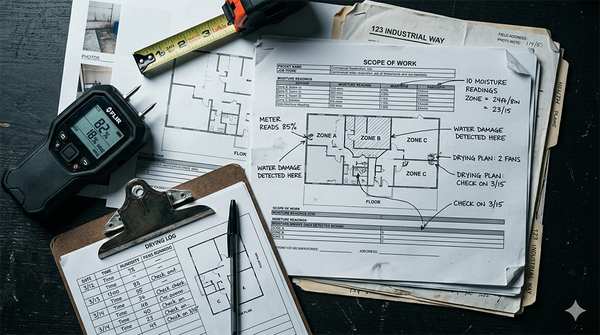
That gap is where margin disappears. A technician logs drying readings in the field app. Those readings don't automatically populate the drying log in the job file. A PM builds the scope after the job closes instead of during, because the field data wasn't structured enough to build from in real time.
An estimate goes to the carrier before the actual equipment hours are reconciled with what was billed. Each of these is a small failure. Across 30 jobs a month, they compound into a profitability problem that looks like a people problem, but isn't.
The gap between your systems isn't a software gap. It's a workflow architecture gap. And you can't automate your way across it until you know exactly where it is.
What AI Workflow Automation Actually Means in a Restoration Context
AI workflow automation is a broad term that means different things in different industries. In a restoration context, it has a specific definition: the automatic movement of job data between the systems your operation depends on, without manual re-entry at each handoff.
That's it. No chatbots replacing your estimators. No AI making scope decisions. The core function is data transport, making sure that what gets captured in the field shows up in the job file, that what's in the job file feeds the estimate, and that what's in the estimate flows to billing without someone copying it from one screen to another.
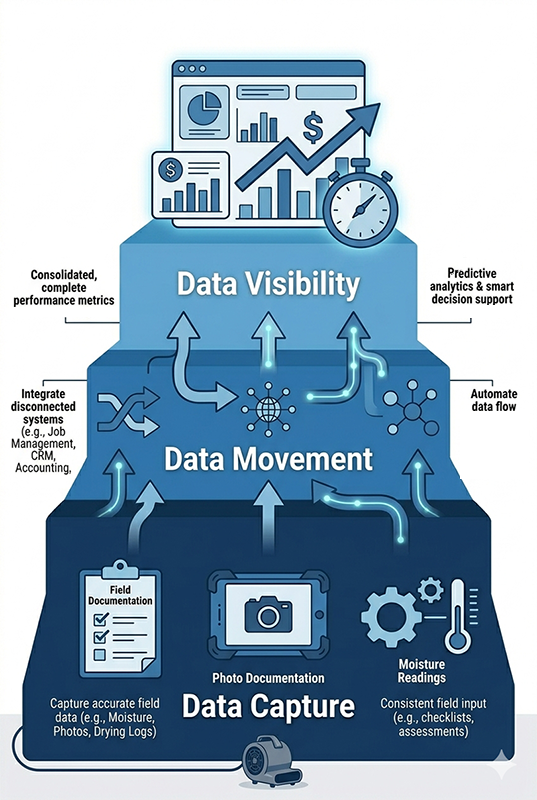
To understand how this works in practice, it helps to think in three layers.
Data Capture: Where the Workflow Starts
Every restoration job generates data from the first site visit forward. Moisture readings, affected square footage, Category and Class determination, equipment placed, photos, scope notes, all of it is raw material for everything that follows downstream. The documentation quality at this stage determines the accuracy of everything built on top of it.
This is where voice-to-scope tools, structured intake forms, and field documentation platforms operate. The question at this layer isn't which app captures the data. It's whether the data being captured is structured consistently enough to be used automatically downstream, or whether it's a mix of free-text notes, inconsistent field labels, and photo sets with no attached metadata that a PM has to manually interpret before they can do anything with it.
What format is the data entering your system in? If the answer is "it depends on the tech," you have a capture problem that no integration will fix.
Data Movement: The Integration Layer
Once data is captured in a structured format, the integration layer moves it between systems. This is where the actual automation lives, the triggers, flows, and connections that eliminate manual re-entry.
An integration might look like this: a job is marked "demo complete" in the field platform, which automatically updates the job status in the CRM, triggers a notification to the PM, and unlocks the next phase checklist. Or: psychrometric readings logged in the field app sync to the drying log in the job file, which updates the monitoring record that gets attached to the insurance documentation package at closeout.
The tools that operate at this layer range from native integrations built into platforms (DASH or Xcelerate to QuickBooks, for example) to middleware automation tools like Power Automate, Make, or n8n that connect systems via API. The right choice depends on which platforms you're connecting and how much custom logic the workflow requires.
Data Visibility: What Connected Systems Actually Produce
When capture is structured and movement is automated, the output is operational visibility. Not a static report pulled at month end, live data showing what's happening across active jobs right now.
Profitability in restoration is not invisible by nature. It's invisible because the data that would reveal it sits in three different systems that don't talk to each other.
A connected operation surfaces what a disconnected one buries: margin by job type in real time, AR aging without a manual spreadsheet pull, documentation completion status before the job closes, and equipment utilization against what was actually billed. This is the intelligence layer, the visibility that emerges when the first two layers are working.
What a Connected Restoration Operation Looks Like in Practice
The three layers are easier to understand when they're running on a real job. Here's what that looks like.
A mold remediation call comes in on a Monday morning. The intake form captures the property address, contact information, loss type, and TPA affiliation before the crew ever leaves the building. That intake record creates the job automatically in the job management platform and opens the CRM opportunity simultaneously. No double entry. The project manager gets a notification with everything already populated.
The crew arrives on site. The lead technician does the assessment: pre-1978 construction, so a lead paint flag goes on the record immediately. Moisture readings are logged in the field app against a structured template, not free-text notes, so the Category and Class determination is explicit and attached to the job file. Photos are tagged by room and stage. The initial scope is dictated on site using a voice capture tool and structured into sections before the crew leaves the property.
Back at the office, the PM doesn't rebuild the scope from a voicemail and a photo dump. The structured field data feeds directly into the scope document. Equipment quantities are calculated from the room dimensions already captured. The IICRC S500 drying documentation requirements for daily psychrometric monitoring are built into the monitoring template, so compliance tracking happens automatically as readings are logged each day rather than being assembled at closeout.
When the job closes, the estimate reconciles against actual hours and materials logged in the field platform. The variance between estimated and actual is visible before the invoice goes out, not six weeks later in QuickBooks. Documentation packages for the carrier are assembled from what's already in the job file, not built from scratch.
What the PM sees throughout the job isn't a status update someone typed into a chat thread. It's live data from a system that knows what's happening because every action in the field is connected to the record in the office.
That's the operational visibility a connected workflow produces. This is also where the connection between documentation quality and estimating accuracy becomes concrete. When field data is structured from the start, the estimating bottleneck that restoration companies mistake for a people problem turns out to be a data architecture problem.
Platform Paths: How Restoration Companies Build Toward This
There is no single platform that solves the connected operations problem out of the box. What exists are several build paths, each with a different starting point, integration ceiling, and adoption cost.
Understanding which path fits your company requires knowing what your critical data lives in today, because the right answer depends almost entirely on that answer.
One more thing worth naming before the paths: running your jobs and understanding your business are two different problems. Most restoration platforms solve the first one.
The intelligence layer that tells you where margin is leaking, which jobs are stuck and why, and what to fix first, that sits on top of the platform, not inside it. The paths below describe how companies get the operational foundation in place. What that foundation produces is covered after.
The Microsoft 365 Path
If your company runs Microsoft 365, Outlook, Teams, SharePoint, Power Automate handles the data movement layer, connecting Microsoft applications to each other and to some third-party platforms through pre-built connectors and custom flows. Power BI handles the visibility layer, surfacing dashboards from connected data sources.
This path has real value when your primary workflows already live inside the Microsoft ecosystem. It becomes a partial solution when they don't, and in most restoration companies, the critical data lives outside Microsoft entirely.
Xactimate has no native Power Automate connector. QuickBooks Desktop requires a third-party sync tool before any automation can reach it. Field documentation platforms sit entirely outside the Microsoft data model.
A company running Outlook and Teams can use Power Automate to automate communication workflows and internal reporting. That's meaningful. But it doesn't connect the job lifecycle, intake to estimate to field documentation to billing, because those workflows don't live in Microsoft to begin with. Knowing that boundary before you start building saves significant time and cost.
Properly structured Google Sheets data can feed a Looker Studio dashboard that gives an ops manager meaningful visibility into job status and margin without a complex BI implementation.
The same boundary applies. One restoration company audited for this post ran Gmail, Google Sheets, Google Calendar, and Airtable as their daily operational tools. The assessment found that Google Workspace automation could improve reporting speed and communication workflows, but it couldn't connect field documentation, estimating logic, and billing into a single operational picture. The data didn't live in Google. It lived across five separate platforms with no common data model.
Google Workspace is a strong supporting layer. It becomes the full solution only when your job operations are already running inside Google tools, which is rare in restoration companies past the earliest stages of growth.
Dedicated Restoration Platforms
DASH (by CoreLogic Next Gear), Xcelerate, and similar platforms are purpose-built for the restoration job lifecycle. They bundle job management, field documentation, scheduling, customer communication, and reporting into a single platform designed around how restoration work actually moves from intake through closeout.
This is the path most companies end up on once the ecosystem tools hit their ceiling. One $3M restoration company running Google Workspace initially explored a field operations platform as their operational core; they subsequently chose Xcelerate, which also absorbed significant CRM functionality that a separate tool had been handling.
A separate $7.5M company running QuickBooks Desktop, Outlook, and DocuSketch landed on the same recommendation for a different reason: the data model inside a dedicated restoration platform already understands Category and Class, equipment tracking, drying phases, and the documentation structure insurance carriers require. No general-purpose ecosystem tool does.
The integration path from Xcelerate or DASH to QuickBooks is more direct than building it from middleware. The automation ceiling once fully integrated is higher than either ecosystem path above. The tradeoff is switching cost and adoption discipline, this is a meaningful operational change, not a feature addition.
Neither DASH nor Xcelerate eliminates the need for Xactimate on insurance-volume work. The question is which platform becomes the operational hub that everything else connects to.
The Intelligence Layer: What Sits Above the Platform
Here is where the conversation usually stops and where it should keep going.
Even a fully implemented Xcelerate or DASH deployment tells you where jobs are in the workflow. It does not automatically tell you which jobs are losing money, which referral sources produce the best margins, where AR is aging past the point of easy recovery, or what the top three operational bottlenecks are costing you per month. That visibility requires a layer above the platform, one that pulls data across job management, accounting, and field operations and surfaces it in a form you can act on.
The difference between running your jobs and understanding your business is the difference between a workflow platform and an intelligence layer. Most restoration companies have the first. Very few have the second.
This is where tools like Power BI and Looker Studio play a legitimate role, not as the hub, but as the reporting surface above the hub.
It is also where AI-assisted analytics, natural language querying of operational data, and automated bottleneck identification are beginning to change what's possible for companies that couldn't previously afford a dedicated analyst or BI team — and where building the right AI implementation sequence in a restoration company determines whether that intelligence layer actually produces decisions or just more data.
What this looks like in practice: an ops manager asks "which jobs are stuck and why" and gets a structured answer drawn from live data across job management and accounting, not a spreadsheet pull and a manual review. A week's worth of AR aging data surfaces automatically with flags on the carriers taking longest to pay.
Job profitability by service type is visible without a month-end accounting exercise. The dedicated platform handles the operation. The intelligence layer explains what the operation is doing and where to focus next. As the positioning puts it plainly: we don't replace your systems, we make them make sense.
The Custom-Build Path and Why It Becomes a Rabbit Hole
Once a restoration owner understands the three-layer architecture, a certain kind of operator starts looking beyond the platform options. They find n8n, an open-source workflow automation tool that can connect virtually any system through APIs.
They find Make or Zapier for lighter automation. They find Vercel as a deployment platform for custom-built dashboards. They discover that with enough API connections, you can theoretically wire together any combination of tools into a custom operational hub built exactly for their company.
The appeal is real. These tools are powerful, genuinely flexible, and inexpensive to run. For companies with the right technical resources and a clear workflow map, they work.
The problem isn't the tools. It's the sequence.
What does "clean data" actually mean in your operation right now? If job records in your management platform are missing Category and Class determinations half the time, an n8n flow that auto-pushes those records to QuickBooks for job costing will push incomplete data at automation speed.
If intake notes are inconsistent, sometimes structured, sometimes a paragraph of free text, an API connection that reads those notes and routes jobs accordingly will route incorrectly without anyone noticing until the margin analysis looks wrong three months later.
Automating an unclear process doesn't clarify it. It executes the confusion faster and at greater scale.
Custom-built integrations also create a maintenance problem that tends to grow quietly. An API connection that works perfectly today depends on both endpoints staying stable.
When a platform releases an update or an API parameter changes, the custom flow breaks. If the person who built it is no longer available, or if it was assembled without documentation, the debugging process becomes expensive and disruptive. Restoration companies have discovered this the hard way after building out n8n environments that required more ongoing maintenance than the manual processes they were designed to replace.
None of this means custom automation is wrong. For companies that have already done the workflow clarity work, who have clean, consistent data in structured systems and know exactly which handoffs they want to automate, building targeted custom flows on top of that foundation is entirely reasonable. The companies that get into trouble are the ones who start with the automation and expect clarity to emerge from it.
The honest guidance: if you find yourself three hours into an n8n tutorial thinking about how to connect your job management platform to your accounting system, stop and answer one question first. Do you know specifically what data you want to move, where it lives, how consistently it's structured, and what happens downstream when it arrives? If any of those answers are uncertain, the build will teach you the uncertainty the expensive way.
Before you build anything, whether that's a Power Automate flow, an n8n integration, or a custom API connection, it's worth understanding where your workflow actually breaks down first. The Restoration Growth Blueprint maps the specific gaps in your operation before any tooling decisions get made.
Workflow Clarity Has to Come First
Every platform path described above shares one failure mode. It produces confident, fast-moving, well-integrated garbage when the workflows feeding it are broken.
This is not a technology problem. It is a sequencing problem.
A restoration company that runs intake inconsistently, sometimes capturing Category determination at first contact, sometimes not, depending on which tech took the call, will carry that inconsistency into every system they connect.
Xcelerate will display it. Power BI will graph it. n8n will move it between platforms automatically. The integration layer makes the inconsistency more visible, faster, and harder to ignore. That can be useful, but it is not the same as fixing it, and the cost of building around broken data is usually higher than the cost of addressing the workflow first.
The same pattern appears downstream. An estimating workflow that depends on complete field documentation to produce an accurate scope will break at the same point every time, the moment field documentation is incomplete, regardless of which platform the scope is written in.
Automating the handoff from field documentation to estimating does not solve the gap in what gets captured on site. It just removes the human check that was previously catching some of it.
The restoration companies that get the most out of connected systems are not the ones that moved fastest. They are the ones that understood their workflows clearly enough to know what they were connecting and why.
This is what workflow clarity work actually produces: a map of how work moves through the business, where the defined handoffs are, what information is required at each stage, and where the current process breaks down before any automation is introduced.
That workflow map is what makes a platform decision sound rather than aspirational. It is also what makes the intelligence layer described above actually intelligent. Feed it clean, consistently structured operational data and it tells you something true. Feed it the output of five disconnected systems with no common data model and it produces metrics that feel meaningful until you try to act on them.
The sequence matters: clarity, then connection, then automation, then intelligence. Skipping the first step does not accelerate the rest. It defers the reckoning until the build is more expensive to unwind.
Frequently Asked Questions About AI Workflow Automation in Restoration
What is AI workflow automation in restoration?
AI workflow automation in restoration is the automatic movement of job data between the systems your operation depends on, without manual re-entry at each handoff. It is not about chatbots or AI replacing estimators.
The core function is data transport: making sure that what gets captured in the field shows up in the job file, that the job file feeds the estimate, and that the estimate flows to billing without someone copying it from one screen to another. When this works, the result is operational visibility, live job status, margin by job type, and AR aging, that most restoration companies currently lack.
How do restoration companies connect their job management and accounting systems?
The connection method depends on which systems you're running. Dedicated restoration platforms like DASH or Xcelerate have more direct integration paths to QuickBooks than general-purpose tools.
Companies running QuickBooks Desktop typically need a third-party sync tool, such as OpenSync or Recur360, before any automation can reach accounting data. Companies running QuickBooks Online have more native integration options available.
In all cases, the integration only works reliably when the data being moved is consistently structured at the source. A connection that pushes incomplete or inconsistently formatted job records will produce unreliable financial data regardless of how well the integration itself is built.
What does a connected restoration operation actually need to work?
Three things in sequence. First, consistently structured data capture, field documentation, intake forms, and scope notes that follow a defined format rather than varying by technician or PM.
Second, a reliable data movement layer, whether that's native integrations between platforms, middleware like Power Automate or Make, or a dedicated restoration platform that handles the movement internally.
Third, a clear workflow map that defines what information is required at each handoff and where responsibility transfers from one role to the next. Without the first two, the third produces a map of a broken process. Without the third, the first two connect systems that are running the wrong workflow faster.
How does automated reporting help restoration companies?
Automated reporting eliminates the manual assembly work that currently sits between operational data and the visibility owners and ops managers need.
Instead of a PM building a daily burn report in Google Sheets by pulling numbers from three separate platforms, the report generates from data already logged in the field platform.
Instead of a month-end accounting exercise to understand job profitability, margin by job type is visible in real time from connected data. The practical impact is not just time saved, it is that the data gets reviewed more frequently because retrieving it no longer requires an hour of manual work, which means problems surface earlier and decisions get made faster.
What platforms support AI workflow automation for restoration businesses?
Three categories of platforms support this, each with different trade-offs. Microsoft 365, specifically Power Automate and Power BI, works well when your primary workflows already live inside Microsoft tools.
Google Workspace with Sheets, Looker Studio, and Gemini provides a lower-barrier path for companies running Google infrastructure.
Dedicated restoration platforms including DASH and Xcelerate offer the highest automation ceiling for the restoration job lifecycle specifically, because their data model is built around how restoration work actually moves from intake through closeout.
Above all three sits the intelligence layer, the analytics and AI-assisted visibility tools that translate connected operational data into the answers restoration owners actually need to run their businesses.
Should I build my own workflow automation or use a dedicated platform?
Custom automation tools like n8n, Make, or API-first builds are not wrong in principle, they are powerful and flexible. They become a problem when they run ahead of workflow clarity.
Building a custom integration before you have consistently structured data and a defined workflow map means automating the inconsistency, not solving it. For most restoration companies, the better sequence is: establish workflow clarity first, choose the platform that fits your existing stack and job volume, then add targeted automation where specific handoffs are well-defined and the data at each end is clean.
Custom builds work well as a later-stage addition to a stable foundation. They work poorly as the first move.
The Bottom Line
AI workflow automation in restoration is not a tool purchase. It is an architectural decision about how data moves through your operation, from the field to the job file, from the job file to the estimate, from the estimate to billing, and from billing to the visibility layer where profitability actually becomes legible.
The platform path that gets you there depends on what your critical data lives in today. Ecosystem tools like Microsoft 365 and Google Workspace solve real problems within their native environment.
Dedicated restoration platforms like DASH and Xcelerate solve the job lifecycle problem that ecosystem tools cannot reach. The intelligence layer above all of them is what turns connected operational data into the answers a restoration owner actually needs to lead the business rather than chase it.
None of it works without workflow clarity first. Connected systems that run on inconsistent data produce faster, more confident versions of the same problems they were meant to solve. The sequence, clarity, then connection, then automation, then intelligence, is not optional. It is the difference between a build that compounds and a build that requires constant maintenance to stay functional.
If there is one thing to take from this post: know what you are connecting and why before you connect it. The platform decision is easier once that answer is clear.
What to Do With This
The restoration companies that get AI workflow automation right do not start with the automation. They start with a clear map of how work actually moves through their business, where data gets captured, where it gets lost, where the handoffs break down, and what information is missing when the PM needs it most.
That clarity is what makes a platform decision sound. It is what determines whether Microsoft 365 automation solves your problem or only part of it. It is what tells you whether a dedicated restoration platform like DASH or Xcelerate is the right operational core or a significant investment in a direction that does not address your actual bottleneck. It is what separates a connected operation that produces real visibility from one that produces more data without more understanding.
The architecture described in this post, data capture, data movement, data visibility, and the intelligence layer above it, is not a technology roadmap. It is a thinking framework. The question it is designed to answer is not "which tools should I buy" but "what does my operation actually need, in what order, and why."
If you have read this post and found yourself mentally mapping your own stack against the platform paths above, that is the right instinct. Workflow clarity work is precisely the process of making that map explicit before any platform or integration decision gets made, because the decisions that compound favorably are almost always the ones made with that map in hand.
The disconnected systems post that precedes this one diagnosed where the operational blind spot lives in a restoration company running fragmented tools. This post described what the connected version of that operation looks like and how companies build toward it. The next question: why automation lands on unclear workflows and stays unused is the one worth asking before any platform decision gets made.
Not Sure Where AI Fits in Your Operations? If you’re unsure whether your workflows are ready for structured AI adoption, start with clarity, not tools.
Jim West is a digital operations specialist and MIT-certified AI strategist who helps restoration companies identify where time, margin, and energy are lost in daily operations. He helps teams simplify systems and work with less friction.