How Restoration Companies Can Build an Always-On AI Workflow Tool Without Buying More Software
Restoration companies can build an AI workflow tool using Claude Projects that already knows their operation, handles scope writing, AR follow-up, triage, and billing reconciliation, without purchasing new industry software, adding another application, or training their team.
Restoration companies can build a purpose-configured AI workflow tool using Claude Projects, a feature of Claude that runs on custom instructions and a persistent knowledge base, without purchasing new industry software, adding another platform to manage, or explaining their workflow every time they open a conversation. The result is an AI assistant that already knows how your operation works, what your documents look like, and what your industry requires.
At a Glance
Most restoration operators have experimented with ChatGPT. What they are describing, pasting in job notes and asking for a scope draft or feeding a voice transcript and hoping for a useful output, is the ad hoc version of something that can be made permanent.
Claude Projects lets you build an AI workflow tool that holds your custom instructions, your document formats, your IICRC standards, and your company's voice across every conversation, indefinitely.
One restoration claims specialist recovered four hours a day by replacing a manual document assembly process with a configured assistant that already knew the required format, the required inputs, and the required output structure.
Unlike a new software application, there is no onboarding process, no vendor relationship, and virtually no learning curve for your team once it is set up correctly. You configure it once to do a specific job, and it does that job the same way every time.
If you ask most restoration company owners whether they're using AI in their operation, the answer is usually some version of yes. They're using ChatGPT. Someone on the team found it useful for drafting emails or cleaning up field notes.
Maybe there's a project manager who pastes Plaud transcripts in and pulls out a rough scope. It works, more or less, when someone remembers to do it.
That's not an AI workflow tool. That's an AI conversation. The difference matters more than it sounds.
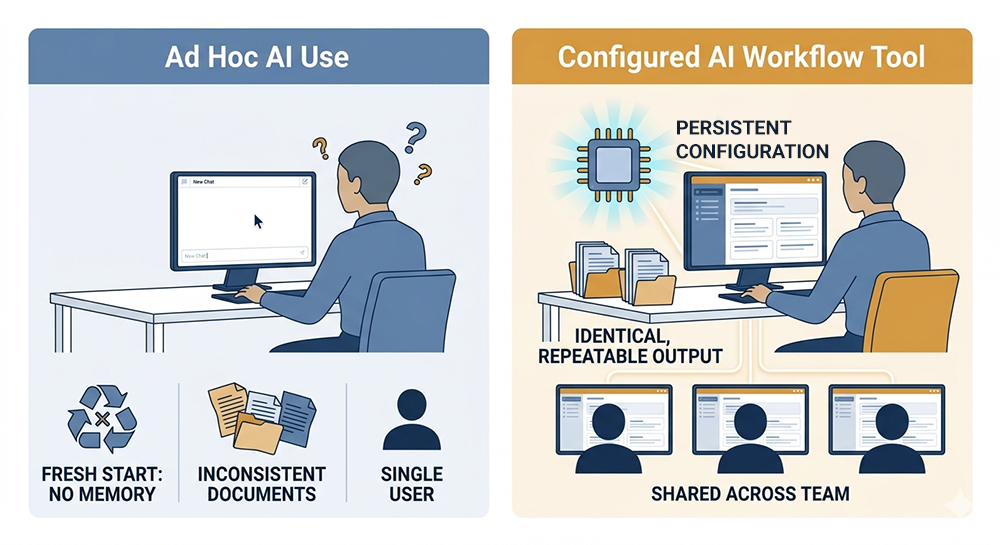
An AI conversation starts from scratch every time. You explain the context, describe the format you need, and remind it what industry you're in and what standards apply. You get something useful, clean it up, and move on.
The next person who tries the same task starts the same process again, explains the same context, and gets a different output because they phrased things differently. There's no consistency, no institutional knowledge, and no compounding benefit. Just a faster first draft, sometimes.
A configured AI workflow tool is something different. It already knows your operation. It knows what a scope of work looks like in your company's format. It knows the IICRC standards that govern your documentation.
The tool knows how you track accounts receivable follow-ups, what your carrier communication templates look like, and how you want interruptions routed and categorized. You don't explain any of that. It's already there, every time, for everyone on your team who uses it.
That's what Claude Projects makes possible, and it doesn't require a software purchase, a vendor contract, or a technical background to run once it's built. What it does require is knowing how to build it correctly, which is where most restoration companies run into trouble.
The Way Most Restoration Companies Are Using AI Right Now
Ask around at any restoration company with more than a handful of employees and you'll find the same pattern. Someone on the team, usually a PM, an estimator, or someone in the office, started using ChatGPT on their own.
The team member figured out that if you paste in enough context, you can get a usable first draft of something. A scope narrative. A follow-up email to an adjuster. A summary of a Plaud transcript from the field.
It works. That's not the problem.
The problem is that it works differently every time, for every person, depending on how they phrase the request and how much context they remember to include.
One estimator gets a clean, structured output. Another gets something that needs twenty minutes of cleanup. A third doesn't know to try it at all. As noted in C&R Magazine's February 2026 coverage of AI in restoration, the companies getting real value from AI are the ones moving past ad hoc experimentation toward something more structured. Most are still in the experimentation phase.
From the job site to the office, something gets lost
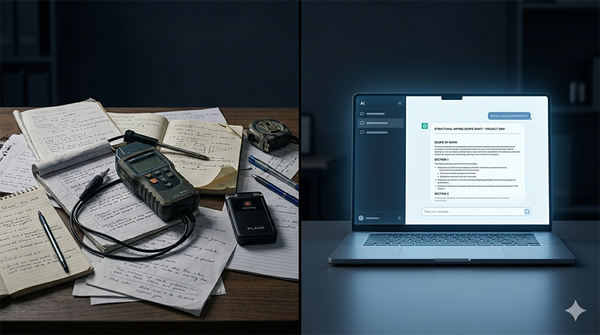
The gap is widest at the handoff point. A technician walks a loss and records a Plaud note: Category 2 water, kitchen and adjacent hallway, hardwood floors showing cupping, drywall wet to 24 inches. Good information. Everything an estimator needs to start a scope.
What happens next depends entirely on whoever receives that recording. If they know how to prompt an AI tool effectively, they might get a solid draft. If they don't, they transcribe manually, fill in a template from memory, and produce something that looks different from every other scope that went out this week. The information was captured. The workflow broke down between capture and output.
That's not an AI problem. It's a configuration problem. The AI has no idea what your scope format looks like, what standards govern your documentation, or what your company's voice sounds like on paper. You haven't told it. And even if you did tell it today, you'll have to tell it again tomorrow.
Why ad hoc AI use produces inconsistent output
The core issue with using any AI tool conversationally is that the tool starts from zero every time. There's no memory of how your company formats a scope of work. No awareness of the IICRC S500 standard and what it requires in a water damage documentation package. No institutional knowledge of how you handle Category 3 losses differently from Category 1, or what your carrier communication templates look like, or which adjuster relationships require a different tone.
You get output proportional to the context you provide in that single conversation. Provide good context, get good output. Provide vague context, get a generic document that requires as much editing as starting from scratch.
The inconsistency isn't a failure of the AI. It's a failure of configuration. A tool that doesn't know your workflow can't automate your workflow.
This is the gap that AI workflow automation built inside restoration operations is designed to close, not by finding a better AI tool to paste things into, but by configuring one that already knows what it's supposed to do before the conversation starts.
What a Purpose-Configured AI Workflow Tool Actually Does
The clearest way to understand what a configured AI workflow tool does differently is to look at what happened in a real trades context before this post gets any more abstract.
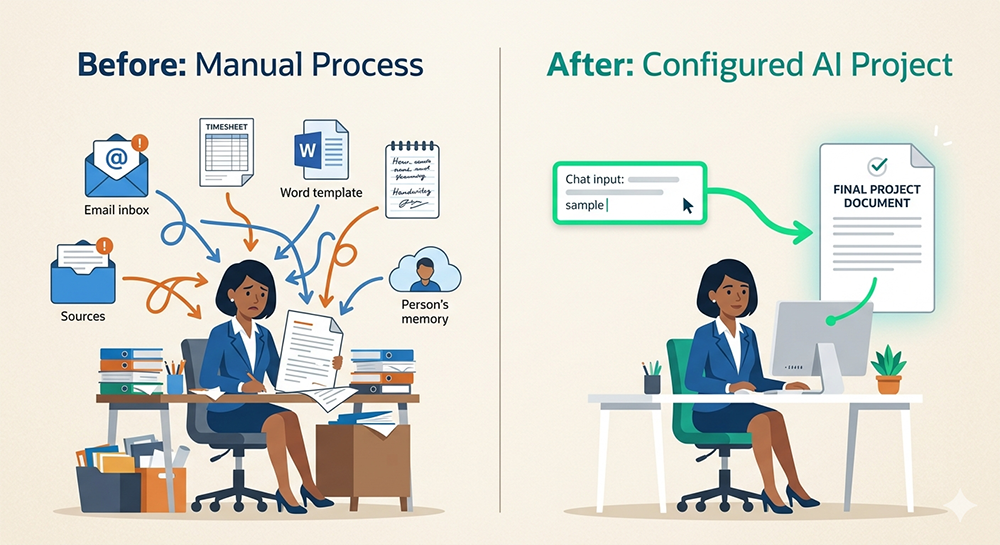
A claims specialist at a restoration and remodeling company was spending roughly four hours a day on document assembly. Pulling information from emails, timesheets, field notes, and past submissions. Validating that everything was present. Drafting summary pages and justification notes. Tracking what had been submitted and what was still pending. All of it done manually, across multiple sources, every day.
A configured AI assistant was built around that specific workflow. It knew what documents were required. It knew how to validate completeness, flag missing items, and generate the summaries in the right format. After the Project was set up, the same work that consumed half the workday was handled in a fraction of the time. Four hours recovered. Every day.
That result didn't come from a new software platform. It came from configuring an AI tool to know a specific workflow, its inputs, its required outputs, and its quality standards, and then getting out of the way.
Configured once, consistent every time
The operational difference between a conversational AI tool and a configured one comes down to what the tool already knows when you open it.
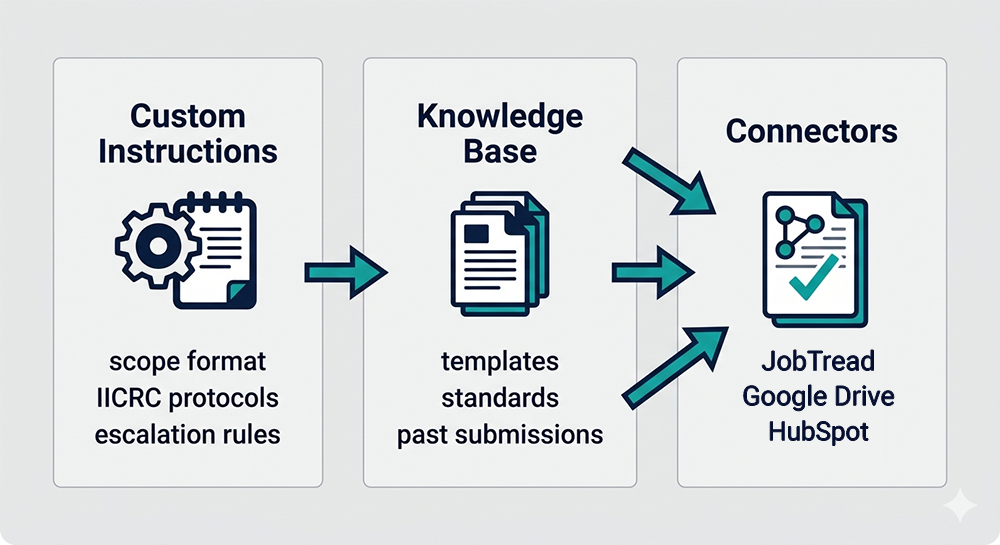
In a configured Project, your custom instructions are always present. They define the output format, the standards that apply, the tone, the structure, and the flags to raise when something is missing.
Your knowledge base holds the reference material: templates, regulatory standards, past examples, carrier requirements. Claude draws from those files across every conversation in the Project without being prompted to do so.
Every team member who uses the Project gets the same starting point. The output looks the same whether it's a PM running a scope draft on Monday or an office administrator following up on an insurance claim on Friday.
A configured AI workflow tool doesn't get better at your job over time. It starts at your standard and stays there.
That consistency is what makes it operationally useful rather than individually useful. Ad hoc AI use benefits whoever figured out the right prompt. A configured Project benefits the entire operation.
What 'always knowing your workflow' looks like in practice
For a restoration company, this is specific. It means the tool knows that a water damage scope follows a numbered hierarchy, not a bullet list. It knows the difference between a Category 2 and Category 3 loss and what that means for the protocol section.
The tool knows what your accounts receivable follow-up email sounds like and what information needs to be in it before it goes out. It knows that when an adjuster hasn't responded in seven days, the output should flag the claim and suggest escalation language.
None of that knowledge exists in a generic AI conversation. It must be built in, through custom instructions that encode your process and standards, and through a knowledge base that holds the reference material your workflow depends on.
That's also where most restoration companies run into trouble. Writing custom instructions that produce consistent output is harder than it sounds.
Building a knowledge base that Claude references correctly, and testing to confirm it does, requires iteration that most operators don't have time for and most technical setups don't account for.
The gap between knowing Claude Projects exists and having a working tool that reliably produces what you need is wider than it first appears.
What's waiting on the other side of that gap is an assistant that just does its job. No interface to learn. No training sessions for your team. No new application login.
When a Project is configured correctly, the learning curve is effectively zero, because the tool already knows the workflow, and your team just uses it the way they'd use any chat window.
What Claude Projects Is and Why It Fits Restoration Operations
Claude is an AI assistant built by Anthropic. Most people who use it treat it the same way they treat ChatGPT: open a conversation, ask a question, get an answer, close the tab.
Claude Projects is a different layer of the same tool. It lets you create a persistent workspace with its own custom instructions, its own knowledge base, and its own memory that carries across every conversation inside that Project. You're not starting from scratch each time. You're picking up exactly where the configuration left off.
For restoration operations, that distinction matters because the work is never generic. A water damage scope follows specific standards. An AR follow-up has a specific format and escalation threshold.
A payroll reconciliation check has specific anomaly flags. An insurance communication has a specific tone depending on the carrier and the claim status.
All of that context belongs in a configured Project that already knows your operation before the first message is typed.
Custom instructions that lock in your format and your standards
Custom instructions are the foundation of a Claude Project. They define how the tool behaves: what it produces, how it structures the output, what standards it applies, what it flags, and what it ignores.
For a restoration scope writing assistant, the instructions encode the numbered section hierarchy, the IICRC protocol requirements, the Category and Class determination logic, and the hazard flags for pre-1980 and pre-1978 buildings. For an AR follow-up tracker, they encode the escalation thresholds, the communication tone, and the output format.
The instructions run silently in the background of every conversation. Your team member doesn't see them and doesn't need to think about them. They just get consistent output that matches your standards every time.
Writing those instructions effectively is where most implementations fall short. Instructions that are too vague produce inconsistent output. Instructions that are too rigid break on edge cases.
Getting the balance right and then testing to confirm the output matches what you intended, requires iteration that most operators underestimate.
A knowledge base that holds your references, your templates, and your company voice
The knowledge base is where your operational context lives. You upload the documents Claude needs to do the work correctly: your scope templates, your carrier communication examples, your past submissions, your documentation checklists, and your company's formatting standards.
Claude already carries working knowledge of IICRC standards from its training. The knowledge base adds your company's specific process layered on top of that foundation.
For the kind of document assembly work that was costing that restoration and remodeling company's claims specialist four hours a day, pulling from Word documents, timesheets, emails, and past submissions to validate completeness and generate summary pages, the knowledge base holds all of it.
The tool knows what a complete submission looks like because you've shown it. It flags what's missing because the standard is already there to compare against.
The knowledge base also accumulates over time. Add a new carrier's documentation requirements. Upload a new scope format. Drop in a set of past supplements that performed well. The Project gets more useful as your operational knowledge grows inside it, without any retraining, replatforming, or vendor involvement.
Connectors that reach into the tools you already run
Claude Projects supports direct connectors to tools restoration companies already use. Available connectors include:
JobTread: Pull live job data directly into your workflow — build estimates, analyze job performance, generate client updates, and surface risks across active jobs without leaving the conversation.
QuickBooks: Connect your accounting data directly to analyze cash flow, generate profit and loss summaries, compare performance against industry benchmarks, and surface financial insights without exporting a single spreadsheet.
HubSpot: Query your CRM, pull contact and deal data, log activities, and generate follow-up actions directly from the Project conversation.
Google Drive: Search, read, and analyze documents, spreadsheets, and folders across your Drive so scope templates, past submissions, and reference files are always within reach of the conversation.
Gmail: Pull email threads into AR follow-up and pending items workflows so the tool works from live data, not manual input.
Microsoft 365: Search and analyze files, emails, calendars, and chats across SharePoint, OneDrive, Outlook, and Teams so your Project works from the same information your team already runs on.
If your application doesn't have a direct connector to Claude but has API access, a custom connector can be developed to connect it to your Claude project. Connecting through Zapier is another possibility, but you'll gain access to more data through a custom connector.
The point is not to replace the tools your operation already runs. It's to connect an AI layer that knows your workflow to the data those tools already hold.
This is also what makes Claude Projects a proving ground for something larger. The connections you build inside a Project, the data inputs, the output formats, the decision logic, are the same architecture that more sophisticated workflow automation is built on.
What works in a Project tells you exactly where structured automation is worth the investment. What breaks tells you where your workflow still needs clarity before any tool can reliably handle it. As covered in The Complete Guide to Restoration Workflow Clarity, that clarity always has to come first.
What Restoration Workflows This Handles
The range of what a configured Claude Project can handle in a restoration operation is wider than most operators expect when they first hear the concept. Scope writing is the most obvious starting point, and it works well.
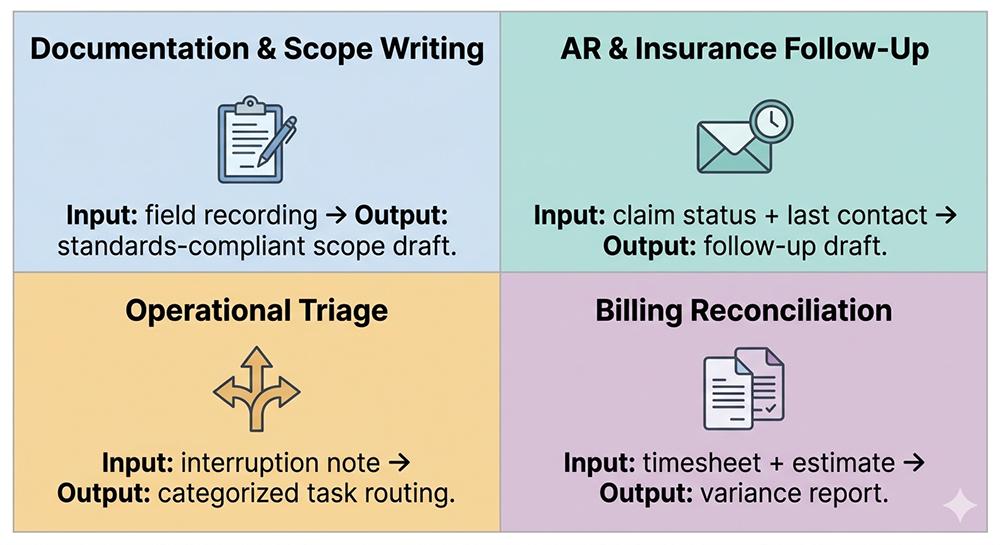
But the same model applies to any workflow that has consistent inputs, a defined output format, and standards that govern the result. In restoration, that describes far more of your daily operation than just documentation. The most common starting points include:
Documentation and scope writing
Accounts receivable follow-up and insurance communication
Operational triage and task routing
Reconciliation and billing validation
Operational Intelligence and daily briefings
Documentation and Scope Writing
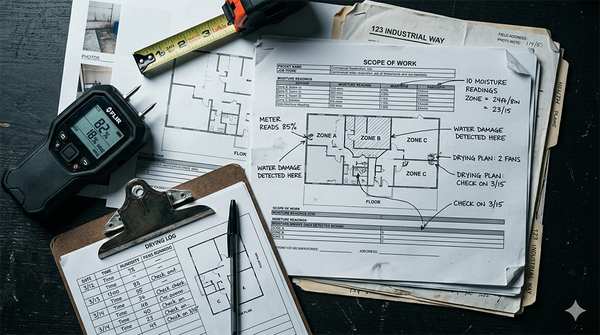
The most immediate application for most restoration companies is documentation. A technician records a Plaud walkthrough on a water loss: Category 2, kitchen and adjacent hallway, hardwood floors showing cupping, drywall wet to 24 inches, pre-1978 construction flagged. That recording becomes the input.
A configured Project that knows your scope format, knows the IICRC S500 standard, knows the protocol differences between a Category 1 and Category 3 loss, and knows to flag lead paint risk on older structures produces a structured, standards-compliant scope draft without the estimator rebuilding context from scratch.
The output isn't generic. It matches your numbering hierarchy, your section structure, and your company's language. It flags what's pending. It notes what requires follow-up before the scope can be finalized. Every draft looks like it came from the same experienced estimator, because the standards and format are locked into the instructions.
What it does not do is replace the estimator's judgment on edge cases. The Project handles the structure. The professional handles the decisions that require eyes on the job.
Accounts receivable follow-up and insurance communication
Cash flow in restoration lives and dies on follow-up discipline. An adjuster who hasn't responded in seven days isn't going to respond without a prompt.
A claim sitting in review for two weeks needs an escalation. Most restoration companies track this manually: a spreadsheet, an inbox, a mental list that gets longer every Friday afternoon.
A configured AR and insurance tracker Project changes the starting point. Feed it an email thread, a claim status, and the last contact date, and it outputs a current status summary, a recommended next action, and a draft follow-up written in your communication tone.
When a claim has gone seven days without a response, it generates escalation language automatically. The office administrator reviewing that output isn't making decisions from memory. She's reviewing a structured recommendation and approving the action.
That's already a meaningful improvement over a manual process. But it's also the floor, not the ceiling.
When a connector or an automation layer ties the Project to live data, the manual input step disappears entirely. An n8n workflow pulling AR data directly from a spreadsheet, for example, can feed the Project automatically and trigger draft follow-ups for every open claim without anyone having to initiate the process.
The Project isn't waiting to be asked. It's running on schedule, working through the AR queue, and surfacing what needs attention before anyone has had their first cup of coffee.
That's the difference between a smarter tool and a functioning system. A Claude Project alone gets you most of the way there. The right connectors get you the rest.
Operational triage and task routing
Interruptions are the hidden time cost in every restoration operation. A subcontractor doesn't show on a mold job. A crew arrives at the wrong address on a Category 2 loss. A new FNOL comes in while three other jobs are mid-drying and the PM is on-site.
A customer calls about delays and no one in the office knows the current drying status. Each one is small in isolation. Together they consume exactly the kind of focused time that documentation and follow-up work requires.
A configured interrupt capture Project gives whoever is fielding those inputs a place to log them fast. Drop in the note, "subcontractor no-show, mold job at 14 Birchwood, crew is waiting," and the Project categorizes it, flags whether it's billable, suggests who should handle it, and notes whether it needs a follow-up before end of day.
When the Gmail connector is in the loop, the manual logging step can disappear entirely. Incoming job-related emails feed the Project directly, so the routing and categorization happen without anyone having to stop what they're doing to process them. The interruption still gets handled. It just doesn't have to interrupt anyone to do it.
Nothing gets routed by memory. Nothing gets forgotten because it came in during a busy hour. The operational load gets captured, sorted, and assigned without the decision fatigue of triaging each item as it hits.
Reconciliation and billing validation
Underbilling is one of the quietest margin problems in restoration. Work gets done that never makes it into the estimate. Equipment runs for five days but the estimate reflects three. A line item gets missed in the closeout rush. Most of these discrepancies aren't caught until the job is closed and the opportunity to recover them is gone.
A configured reconciliation Project cross-references payroll exports against billing sheets and flags the anomalies. An employee worked 30 hours on a job where the estimate reflects 22. Equipment was deployed for four days past the original drying estimate.
The Project surfaces those gaps and suggests whether the variance is billable, so the person reviewing it can make the call rather than discover the discrepancy after the fact.
Every hour of unbilled work that gets caught before closeout is margin that was already earned. A configured Project makes the comparison automatic instead of manual.
Operational intelligence and daily briefings
Most restoration companies don't lack data. They lack a fast way to turn that data into a decision. Job statuses live in one place, AR balances in another, crew assignments somewhere else. Pulling it together into a clear picture of where things stand takes time that most operators don't have before the day's first fire drill starts.
A configured operational intelligence Project changes that equation. Connect it to your job management data, your AR tracking, and your open task list, and ask it what needs attention today. It surfaces what's behind schedule, what claims need follow-up, what's unbilled, and what decisions are waiting on someone. No dashboard to build. No report to run. Just a clear answer to the question every owner and ops manager asks every morning.
The most immediate version of this is a daily briefing. A configured Project can generate a structured morning summary in minutes: active jobs and their current status, open AR items by age, crew assignments and any scheduling gaps, and flagged items that need a decision before end of day. What used to require pulling from three systems and time for mental assembly takes a single prompt and a couple of minutes.
That's not a reporting tool. That's a decision layer, one that already knows your operation and tells you where to focus.
A note on what this doesn't replace
None of these workflows remove the professional judgment that restoration operations depend on.
A configured Project doesn't determine Category and Class on a loss: a trained technician does. It doesn't decide whether a claim warrants escalation: an experienced operator does. It doesn't replace the estimator who knows what the adjuster on a specific carrier program is likely to challenge.
What it removes is the administrative layer that sits between the professional's judgment and the document that captures it. The work of assembling, formatting, cross-referencing, and tracking: that's where configured AI earns its place in a restoration operation.
That division of labor, AI for retrieval and structure, humans for judgment and decisions, is the core of the human-in-the-loop model for restoration operations, and why it produces better adoption than automation-first approaches.
Ready to improve your margins and recover hours your team is losing to manual documentation? The Restoration Growth Blueprint is a structured operational audit that identifies exactly where time and margin are leaking before any tool is applied.
Why This Functions as a Proving Ground, Not Just a Tool
There's a strategic dimension to Claude Projects that most operators miss when they first encounter the concept. A configured Project doesn't just automate a workflow. It reveals what your workflow actually is.
When you build the custom instructions for a scope writing assistant, you have to define exactly what a complete scope looks like. What sections are required. What flags need to be raised. What information must be present before the document can be finalized.
If you can't answer those questions precisely enough to write them into instructions, the Project will show you that immediately, not through an error message, but through inconsistent output that tells you the process isn't defined clearly enough to be automated reliably.
That's the workflow clarity test. The places where your instructions produce clean, consistent output are the places where your workflow is well-defined. The places where output drifts, where the tool asks for clarification, where the result needs significant human correction, are the places where your process has gaps that no tool can paper over.
A Claude Project doesn't just do your work. It shows you exactly where your work is defined and where it isn't, which is the same information you need before any larger automation investment makes sense.
What the output tells you about your process
The diagnostic value compounds over time. Run a scope writing Project for thirty days and you'll see patterns in what it gets right and what it flags as pending or unclear. Those patterns are a map of where your documentation workflow is strong and where it breaks down.
An AR follow-up tracker that keeps generating 'insufficient information to determine next action' responses tells you that your claim tracking doesn't capture the data points the follow-up process actually requires. That's not a Project problem. That's a workflow problem the Project just surfaced.
Most restoration companies that go through this process come out the other side with a clearer picture of their operation than they had going in, and a much more specific set of questions about where structured automation would move the needle.
A note on plan selection and data security
Before a restoration company deploys any Claude Project that handles client data, property addresses, insurance claim numbers, carrier communications, and job-specific documentation, the plan selection matters.
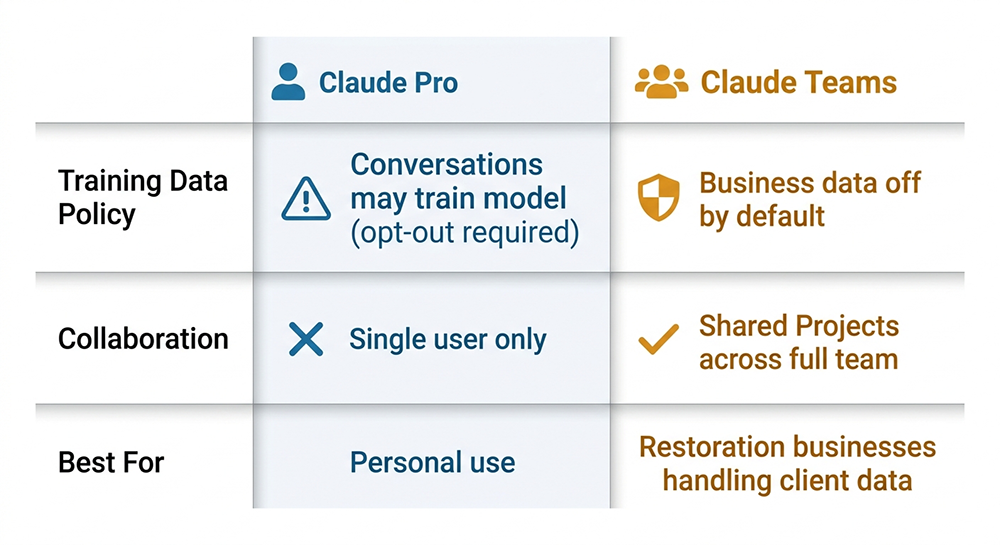
Claude Pro is an individual consumer plan, currently priced at $20 per month. By default, conversations on Pro accounts can be used to improve Claude's models unless the user opts out. That's an appropriate tradeoff for personal use. It's not the right posture for a business handling client information.
Claude Teams is the right starting point for restoration operations. Training on business conversations is off by default on Teams, meaning your client data, your scope content, and your claim communications stay inside your workspace. Teams also enables the collaboration that makes Projects operationally useful across a restoration company:
Field staff, estimators, project managers, and office administrators all working from the same configured Project
The same instructions and output standards regardless of who initiates the conversation
Admin controls for seat management and usage tracking
An administrator and a PM both using the same AR follow-up tracker get the same format, the same escalation logic, and the same output standard without any coordination overhead. The full breakdown of what each plan covers is worth a direct conversation before you build.
How to Think About Getting Started
The most common mistake restoration companies make when they encounter this concept is trying to build everything at once. They want a scope writing assistant and an AR tracker and a pending items command center and a payroll reconciliation checker, all configured and running before anyone commits to the approach.
That's the software adoption mindset: evaluate the full feature set, implement across the operation, train the team.
A Claude Project doesn't work that way. And that's the point.
Start with the task that costs you the most time
Pick one workflow. The one that consumes the most hours, produces the most inconsistency, or creates the most downstream problems when it goes wrong.
For most restoration companies that's somewhere in documentation, AR follow-up, or operational triage, but the right answer is specific to your operation, not a general rule.
The question to ask is simple: what does your team do repeatedly, with inputs that are mostly the same each time, that produces a document or a decision as output? That's the workflow a configured Project can handle. Start there. Get it working. Understand what it does well and where it needs refinement before adding the next workflow.
The right first Project is the one that proves the concept inside your specific operation, not the one that looks most impressive on paper.
This is also where the configuration work reveals itself. Writing custom instructions that reliably produce the output you need is harder than most operators expect.
The instructions must be specific enough to enforce consistency but flexible enough to handle the variation that real restoration jobs produce. The knowledge base has to be structured so Claude references it correctly rather than ignoring it. Testing must cover enough scenarios to confirm the output holds up under real conditions, not just ideal ones.
Getting from a rough configuration to a tool that works the same way every time requires iteration and knowing what to adjust based on what the output is telling you. That's the work that separates a Claude Project that saves four hours a day from one that produces inconsistent results and gets abandoned after two weeks.
What your workflow needs to be clear on before the Project can work
A Claude Project can only be as consistent as the workflow it's built around. If your scope writing process has no defined format, if every estimator structures their output differently based on personal preference, the Project will reflect that ambiguity.
If your AR follow-up process has no escalation threshold, no defined point at which a non-responding adjuster gets a different type of communication, the Project can't enforce one.
This is the workflow clarity requirement that sits underneath every successful implementation. It doesn't mean your process has to be perfect before you start. It means you must be able to answer the questions the configuration forces you to ask:
What does a complete output look like?
What inputs are required?
What standards govern the result?
What gets flagged as missing versus handled by default?
If you can answer those questions, the Project can be built to enforce them. If you can't answer them yet, the process of trying to build the Project will surface exactly where the answers are missing, which is useful information regardless of what you build next.
What is Claude Projects and how is it different from using ChatGPT?
Claude Projects is a persistent workspace inside Claude that holds custom instructions, a knowledge base of uploaded documents, and conversation memory that carries across every session, so the tool already knows your workflow before the first message is typed.
Standard ChatGPT use, and standard Claude use without a configured Project, starts from scratch each conversation. You explain the context, describe the format, and remind the tool what industry you're in. A configured Claude Project eliminates that setup permanently.
For a restoration company, that means:
A scope writing assistant that already knows the IICRC standards
An AR tracker that already knows your escalation thresholds
A pending items command center that already knows how you categorize operational tasks
None of that has to be re-explained. It's already there, every time, for everyone on your team who uses it.
Does setting up a Claude Project require technical skills or coding?
No coding is required to build a Claude Project. The interface is conversational and the tools are accessible without a technical background. What it does require is the ability to write precise custom instructions that produce consistent output, and that turns out to be harder than most operators expect.
Instructions that are too vague produce inconsistent results. Instructions that don't account for edge cases break on real jobs. The knowledge base must be structured so Claude references it correctly rather than ignoring it. Testing must cover enough scenarios to confirm the output holds up under real conditions, not just ideal ones.
The technical barrier is low. The configuration barrier is real, and it's where most first attempts fall short.
What kinds of restoration documents and workflows can a Claude Project handle?
A configured Project can handle any workflow that has consistent inputs, a defined output format, and standards that govern the result. In restoration operations, that typically includes:
Scope of work drafts generated from field recordings or notes
Accounts receivable follow-up tracking and adjuster communication
Operational triage and task routing from interruptions and field updates
Payroll and billing reconciliation against timesheets and job records
Insurance communication templates
Compliance and training tracking
The range is wider than most operators expect because the model applies across more of the daily operation than just documentation.
Can a Claude Project connect to various restoration tools?
Many connectors are available inside Claude Projects. For most of these, setup is toggle-based and requires no technical background. Available options include:
JobTread: Pull live job data directly into your workflow, build estimates, analyze job performance, generate client updates, and surface risks across active jobs without leaving the conversation.
QuickBooks: Connect your accounting data directly to analyze cash flow, generate profit and loss summaries, compare performance against industry benchmarks, and surface financial insights without exporting a single spreadsheet.
HubSpot: Query your CRM, pull contact and deal data, log activities, and generate follow-up actions directly from the Project conversatio.n
Asana: Create and assign tasks, generate project plans, and check status in real time.
Gmail: Pull email threads into AR follow-up and pending items workflows for live data access.
Microsoft 365: Search and analyze files, emails, calendars, and chats across SharePoint, OneDrive, Outlook, and Teams so your Project works from the same information your team already runs on.
Google Drive: Search, read, and analyze documents, spreadsheets, and folders so scope templates, past submissions, and reference files are always within reach of the conversation.
Notion: Connect internal documentation or knowledge bases.
If your application doesn't have a direct connector to Claude but has API access, a custom connector can be developed to connect it to your Claude project. Connecting through Zapier is another possibility, but you'll gain access to more data through a custom connector.
What is the difference between Claude Pro and Claude Teams for a restoration business, and which plan is right?
For any restoration company running Claude Projects that handle client data, property addresses, claim numbers, carrier communications, and job documentation, Claude Teams is the appropriate plan.
On Claude Pro, an individual consumer account priced at $20 per month, conversations can be used to improve Claude's models unless the user actively opts out. That default is acceptable for personal use. It is not the right posture for a business handling client information.
On Claude Teams, training on business conversations is off by default, meaning your operational data stays inside your workspace. Teams also enables the collaboration that makes Projects useful across a restoration operation. Field staff, estimators, project managers, and office administrators all work from the same configured Project with the same instructions and the same output standards.
For a restoration company where consistency across job types and team members directly affects documentation quality and cash flow, that shared configuration is where the operational value compounds.
How is this different from AI features built into job management software?
AI features embedded in job management platforms are designed and maintained by the software vendor. They work within the platform's boundaries, apply the vendor's interpretation of what the output should look like, and update on the vendor's schedule.
A configured Claude Project is built around your specific workflow: your scope format, your standards, your company's voice, and your escalation thresholds. It doesn't require the platform vendor to anticipate your process or build a feature that matches it.
It also functions as a proving ground independent of any software vendor relationship. What works in a Project identifies where more structured automation is worth building, and what breaks identifies where your workflow needs clarity first. Platform AI features work within the software. A configured Project works around your operation.
What about Copilot, Gemini, or NotebookLM? Can those do the same thing?
Each of those tools serves a real purpose, and if your company runs Microsoft 365 or Google Workspace, they are worth understanding. The distinction matters for this specific use case.
Building a persistent, custom-instruction-driven workflow tool inside Microsoft Copilot requires Copilot Studio or Declarative Agents, a configuration layer that typically involves IT setup or developer involvement.
Copilot's knowledge base capabilities draw from SharePoint, OneDrive, and M365 infrastructure, which is powerful in enterprise environments but adds complexity for a restoration company that just needs to configure a scope writing assistant around their specific format and standards.
Gemini for Workspace integrates well with Google apps and handles contextual tasks inside Docs, Gmail, and Sheets. It doesn't offer the same combination of project-persistent custom instructions and a user-uploaded knowledge base in a single configurable workspace that a non-technical operator can build and run independently.
NotebookLM is a different tool for a different purpose. It's designed for research synthesis: pulling from sources, generating summaries, and helping users understand large amounts of information. It's not built to enforce a specific output format, apply a set of operational standards, or function as a workflow automation tool for document generation and task tracking.
Claude Projects fits this specific use case because the configuration layer is accessible without technical infrastructure, and the output can be precisely shaped around a restoration company's actual workflow.
For companies already running M365 or Google Workspace, those platforms have their own implementation paths for AI-assisted workflows that are worth exploring separately.
The Bottom Line
Claude Projects gives restoration companies a way to build AI workflow tools that are configured around their specific operation: their document formats, their industry standards, their escalation thresholds, and their company voice.
The tool delivers consistent output across the entire team without onboarding a new platform or managing a vendor relationship. The model works because the tool already knows the workflow before the conversation starts.
Scope writing, AR follow-up, operational triage, billing reconciliation: any workflow with consistent inputs and a defined output format is a candidate.
The configuration work is where most implementations succeed or fall short. Writing custom instructions that produce reliable output, building a knowledge base Claude references correctly, and testing across enough real scenarios to confirm consistency: that's the work that separates a Project that saves hours every day from one that gets abandoned after two weeks. Getting that right is worth doing once and doing correctly.
Building It Right Is the Work
The concept behind a configured Claude Project is straightforward enough that most restoration operators understand it immediately.
You build an AI assistant around a specific workflow, load it with the standards and formats that workflow requires, connect it to the data sources it needs (if applicable), and it produces consistent output every time someone uses it: without a new industry platform, without another application to manage, and without a learning curve for the team.
The execution is where the distance between the concept and a working tool becomes apparent.
Writing custom instructions that hold up across the variation that real restoration jobs produce is harder than it looks.
Building a knowledge base that Claude references correctly, rather than ignoring in favor of a generic response, requires knowing how to structure the files and how to direct the instructions toward them.
Testing must be thorough enough to surface the edge cases that will show up in daily use, and iteration has to be deliberate enough to fix them without breaking what already works.
Creating a Claude Project doesn’t require a technical background. It requires knowing what good output looks like, understanding what the configuration is telling you when the output falls short, and having the patience to close the gap between the two.
That process is exactly what separates a restoration company that builds a Project and abandons it after two weeks from one that recovers four hours a day for a claims specialist and then builds the next one.
Wondering whether your operation is ready for Claude Projects and which workflow to start with? Book a free AI clarity call to work through where a configured Project fits your specific operation and what it would take to build one that actually holds up under daily use.
Jim West is a digital operations specialist and MIT-certified AI strategist who helps restoration companies identify where time, margin, and energy are lost in daily operations. He helps teams simplify systems and work with less friction.