Last Updated: April 12, 2026

Most restoration companies using AI are running a single general-purpose tool across every workflow. The problem isn't the tool, it's the mismatch between what a standalone chat interface can do and what restoration operations actually require.

At a Glance

Restoration companies running Microsoft 365 or Google Workspace are already paying for embedded AI, Copilot and Gemini respectively, that handles connected, system-aware workflows better than a standalone chat interface. Most are using ChatGPT instead, not because it performs better, but because it's familiar. This post maps three specific restoration workflows to the tool that fits each one, and explains the deployment logic that determines which AI belongs where.

Ask a restoration owner which AI tools their company uses and the answer is almost always the same: ChatGPT. Maybe one person on the team uses it consistently, maybe a few people open it when they're stuck on a scope narrative or need to draft a quick email. It's useful enough that it sticks around. But it's rarely doing what AI could actually be doing inside a restoration operation.

That's not a critique of ChatGPT. It's a genuinely capable tool. The issue is that most restoration companies are asking it to do work it wasn't designed for, connected, in-context tasks that require visibility into the systems where the job actually lives, while ignoring the AI tools built specifically for that kind of work.

If your company runs Microsoft 365, you likely have access to at least Microsoft 365 Copilot Chat at no additional cost. Full in-app Copilot integration requires a separate license, but the connected AI capability your operation needs is already inside the platform your team runs on.

If you run Google Workspace, Gemini in Google Workspace is embedded in the tools your team uses every day. These aren't add-ons you need to evaluate. They're already part of the platforms your operation runs on. And for a specific category of restoration workflows, they outperform a standalone chat interface, not because they're smarter, but because they're connected to the work.

Understanding which tool belongs where is the same discipline as understanding how AI workflow automation actually works inside restoration operations. The capability doesn't create value on its own. The deployment logic does.

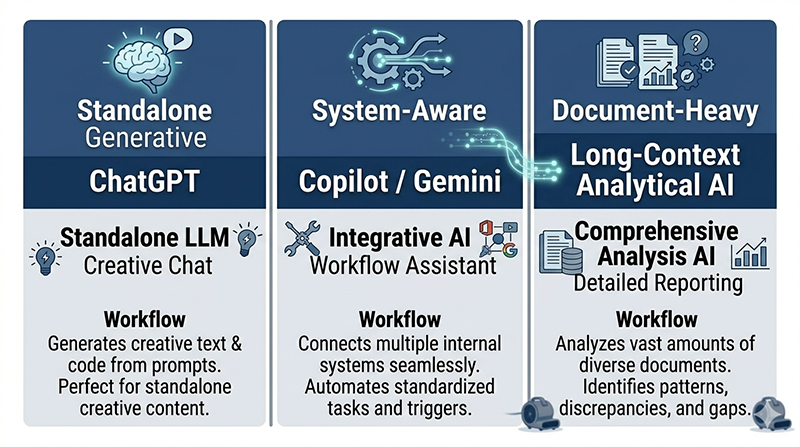
restoration ai workflow tool deployment diagram showing which ai tool fits which workflow type

The One-Tool Pattern and Why It Forms

There's a predictable sequence to how restoration companies end up with ChatGPT as their only AI tool. Someone on the team, usually the owner, an estimator, or a project manager, starts using it on their own. They find it useful for drafting a tricky scope narrative or knocking out a quick email to an adjuster. They tell someone else on the team. That person tries it. It works well enough to stick.

What never happens in that sequence is a deliberate decision about which workflows AI should touch and which tool fits each one. ChatGPT gets adopted because it's accessible and general-purpose, not because anyone evaluated it against the specific demands of a restoration operation. It fills the space that a more intentional deployment would occupy.

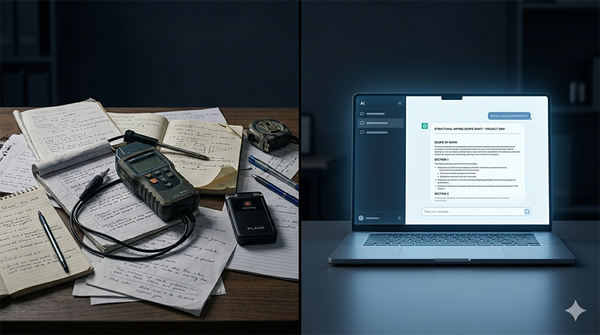
That's not a failure of judgment. It's how most tool adoption happens in small service businesses. But it creates a specific problem: the tool that's easiest to start using isn't always the tool that fits the work.

The single-tool pattern isn't a sign that a restoration company is behind on AI. It's a sign that no one has asked which workflows they're actually trying to fix.

Restoration operations are coordination-heavy and documentation-intensive in ways that most general business contexts aren't. A PM juggling six active jobs across two crews needs AI that can surface what's happening across those jobs without being manually loaded with context every time.

An estimator working inside Xactimate and Outlook needs AI that can reach into those environments, not just respond to what gets pasted into a chat window. ChatGPT doesn't do either of those things, not because it's limited, but because it was never designed for connected, in-context work.

The gap between what restoration operations need and what a standalone chat interface delivers is the same gap that disconnected systems create across the rest of the business. Different symptom, same root cause: tools that work in isolation can't see the full picture.

What a Standalone Tool Can and Can't See

The distinction that matters here isn't about which AI is more powerful. It's about what each tool can access when you ask it to help with a task.

ChatGPT works on what you bring to it

Every conversation with ChatGPT starts from zero. It has no visibility into your job management platform, your open Outlook threads with adjusters, your SharePoint folder of job photos, or the drying log your technician updated this morning. When it produces something useful, it's because you brought the right inputs, you pasted in the scope notes, typed out the job details, copied over the carrier's response.

That's a genuine capability for certain tasks. An estimator who pastes in field notes and asks ChatGPT to draft the narrative language for a Category 2 water loss in a finished basement is using the tool exactly as designed. The inputs are self-contained, the output is generative, and the value is real.

The problem surfaces when restoration teams try to use that same tool for work that isn't self-contained. A project manager asking ChatGPT to help summarize job status across six active losses has to manually compile that information first. The AI can organize and write, but it can't reach into the systems where the status information actually lives. Every use case that requires connected context runs into the same wall.

Embedded AI works on what's already there

This is what makes Copilot and Gemini different in a restoration context, not raw capability, but access.

Microsoft Copilot for Microsoft 365 operates inside Teams, Outlook, Word, and SharePoint. It can pull from email threads, draft responses that reflect what's actually been discussed, summarize meeting notes, and surface files relevant to a current task, all without you manually loading the context.

If a PM needs a status update on a job, Copilot can pull from the relevant Teams channel and Outlook thread to draft one. The work is already in the system. Copilot can see it.

Gemini in Google Workspace operates the same way inside Gmail, Docs, Sheets, and Drive. For restoration companies running Google Workspace, it can draft emails that reference existing thread history, summarize documents in Drive, and work across the tools the team already uses daily.

The value of embedded AI isn't that it writes better. It's that it already knows what happened.

This is the distinction that the workflow clarity work that precedes any AI deployment makes visible. When workflows are mapped and data lives in consistent places, embedded AI has something coherent to work with. When data is scattered across platforms and people's inboxes, no AI tool, embedded or standalone, can make sense of it.

The data risk most restoration companies haven't thought about

There's a practical security consideration that changes the standalone vs. embedded comparison for restoration operations specifically.

When an estimator pastes a scope into ChatGPT — property address, policyholder name, claim number, carrier details, coverage information — the data risk depends on which plan your company is using.

Free and Plus accounts enable model training by default, with an opt-out available in settings but no formal data processing agreement in place. If your team is using ChatGPT through a consumer account, your client data may be used to train OpenAI's models unless that toggle has been explicitly turned off.

The question every restoration company should ask: which plan are we actually on, and does it include a data processing agreement?

ChatGPT Team accounts do include a DPA that prohibits training on your data, and training is off by default.

ChatGPT Enterprise goes further with full data isolation. But many small restoration companies are running Free or Plus accounts — often because individual team members signed up personally — with no organizational data controls in place.

Embedded AI sidesteps this problem by design. Copilot operates within your company's Microsoft 365 tenancy. Gemini operates within your Google Workspace environment.

Data stays inside the organization's existing infrastructure and is governed by the agreements already in place with those vendors, the same agreements covering every other file and email in those systems. For restoration companies handling insurance claims, PII, and carrier data at volume, that's not a minor distinction.

The right AI tool for connected restoration workflows isn't just the most capable one. It's the one that keeps your clients' data where it belongs.

Three Restoration Workflows, Three Different Tool Fits

The following isn't a ranking. It's a deployment map. Each workflow below represents a real task that restoration teams handle regularly, and each illustrates why the tool fit matters more than the tool itself.

Drafting supplement narratives and scope language

This is where ChatGPT earns its place in a restoration operation.

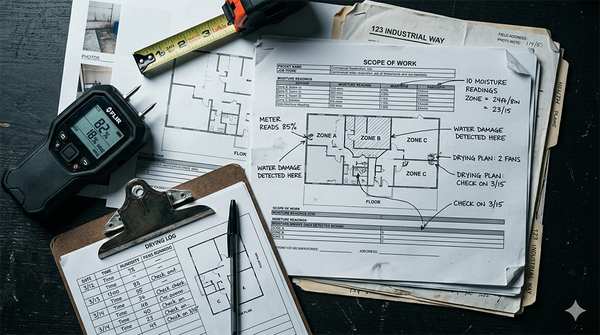
An estimator working a fire loss has field notes, photos, a preliminary Xactimate estimate, and a carrier response pushing back on three line items. They need to write the supplement narrative, the prose explanation that justifies the scope, connects the damage to the standard, and gives the adjuster something defensible to approve.

That's generative, standalone work. The estimator brings everything the AI needs: the job details, the challenged line items, the relevant IICRC language. ChatGPT takes those inputs and produces a draft narrative faster than starting from a blank document. It doesn't need to see inside Xactimate. It doesn't need to pull from a Teams thread. The value is in the writing, and the estimator controls the inputs.

The same logic applies to drafting scope narratives for a mold remediation project under S520, writing customer-facing communication explaining the drying timeline on a Category 3 water loss, or preparing the written rationale for equipment quantities on a Class 4 hardwood drying job. Any task where the restoration professional brings the context and needs help producing the language, ChatGPT handles that well.

When the inputs are self-contained and the output is language, a standalone chat interface is exactly the right tool.

Job status updates and internal communication flow

This is where embedded AI justifies its subscription cost for restoration teams.

A project manager running eight active jobs, two in mitigation, three in drying, two waiting on adjuster approval, one in reconstruction, spends a meaningful portion of every day answering the same question from different directions: where does this job stand? The owner wants a summary before the afternoon call. The office coordinator needs to know which jobs are ready to close. The estimator is waiting on field data before opening Xactimate.

Manually consolidating that status means opening the job management platform, checking the relevant email threads, reviewing the last field update, and writing a summary from scratch. Multiply that by eight jobs and it's not a quick task.

A PM running Microsoft 365 can use Copilot to pull from the relevant Teams channels and Outlook threads and draft a status summary that reflects what's actually happened, without manually loading each job into a chat window. The context is already in the system. Copilot can see it. For restoration teams running Google Workspace, Gemini operates the same way across Gmail and Drive.

This is the category of work where the connectivity matters more than the writing quality. The time savings come from not having to gather the information first, and that's something a standalone tool structurally cannot do. For restoration teams ready to take that further, how those systems connect across the full job lifecycle shapes the platform decision as much as the tool selection does.

Document review and insurance communication analysis

A carrier sends back a coverage denial or a significant scope reduction on a water loss. The response is four pages. It references the policy language, challenges the Category determination, and disputes the equipment quantities. The PM needs to understand exactly what was challenged, identify where the scope documentation supports the original estimate, and draft a reply that addresses each point specifically.

This is analytical, document-heavy work. It requires reading a long document carefully, cross-referencing it against existing scope language, and producing a structured response. A tool with strong document comprehension and longer context handles this more reliably than a general-purpose chat interface working from a paste.

The distinction here isn't about any specific platform, it's about matching the cognitive demand of the task to the tool's design strengths. Long-form document analysis and multi-document cross-referencing reward tools built for that kind of sustained reasoning.

Feeding a four-page carrier denial into a chat interface and hoping for a useful response is a different experience from giving that same document to a tool designed to hold and reason across large amounts of text at once.

Restoration companies handling a high volume of supplement work or carrier disputes will notice the difference in output quality when they match the task to the right tool rather than defaulting to whatever they opened last.

The Deployment Question That Changes Everything

Most restoration companies approach AI the way they approached their first job management platform: they find something that works well enough and they use it for everything. That's not irrational. It's how small businesses manage tool sprawl. But it produces a specific blind spot, the assumption that one capable tool is interchangeable with a different capable tool built for a different kind of work.

The question that breaks that pattern isn't "which AI is best?" It's a narrower question asked before any tool gets opened: what does this workflow actually require?

Two criteria answer it most of the time.

Does this task require information from systems the AI can access, or are you bringing all the inputs manually? If the work lives inside Teams, Outlook, SharePoint, Gmail, or Drive, if the relevant context already exists in the platforms your team uses, an embedded tool has a structural advantage. It can see what's there. A standalone tool can only work with what you paste in.

Is this generative work, or does it require connected context? Drafting a supplement narrative from field notes is generative. The estimator brings the inputs and the AI produces the language. Summarizing job status across active losses is connected-context work. The information already exists in your systems and the task is surfacing and organizing it. These are different cognitive demands, and they reward different tools.

Running those two questions against a restoration workflow takes about thirty seconds. The answers route most tasks clearly, not because the tools are incompatible, but because each was designed with a different kind of work in mind.

Picking the right AI tool isn't a technology decision. It's a workflow clarity decision made before anything gets opened.

This is the same discipline that makes any operational improvement stick in a restoration business. It's also why restoration teams work around tools that don't fit the workflow and why the deployment decision becomes obvious once the workflow question is answered first.

Not sure which workflows in your operation are getting the wrong tool? The Restoration Growth Blueprint is a structured operational audit that maps where friction lives before you decide what to fix.

Frequently Asked Questions


Is ChatGPT useful for restoration companies?

Yes, for the right workflows. Supplement narrative drafting, brainstorming scope language, drafting customer-facing communication, and ad hoc question answering are all valid use cases where ChatGPT delivers real value. An estimator using it to draft the written justification for a disputed line item, or a PM using it to write a status email from notes they've already compiled, those are good fits. The tool was designed for generative, standalone work and it handles that category well.

The problem isn't using ChatGPT. It's using it for connected, system-aware tasks it was never designed to handle, pulling job status from across active losses, surfacing information from files and threads in your job management platform, or working across the systems where your operation actually runs.

When restoration teams hit friction with ChatGPT, it's almost always because the task required connected context and the tool could only see what was manually pasted in.


What does Microsoft Copilot do that ChatGPT doesn't?

Copilot operates inside your Microsoft 365 environment, Teams, Outlook, SharePoint, Word, and can pull from files and conversations that already exist in those systems. ChatGPT only works with what you bring to it in a chat window.

For a restoration PM running Microsoft 365, that distinction is practical: Copilot can draft a job status update by pulling from the relevant Teams channel and Outlook thread without the PM manually compiling that information first. The context is already in the system. Copilot can see it. That's not a feature ChatGPT can replicate regardless of how well you prompt it, because the information was never in the chat to begin with.

The value isn't that Copilot writes better. For most generative tasks, the output quality is comparable. The value is that it already knows what happened inside your Microsoft 365 environment, which eliminates the manual context-loading step that makes standalone tools slower for connected work.


Should a restoration company use more than one AI tool?

Most already do, even if unintentionally, an owner using ChatGPT, an estimator using a different tool for scope writing, someone else using the AI features built into their job management platform. The goal isn't to add tools deliberately. It's to use the tools you're already paying for more intentionally.

A restoration company running Microsoft 365 is already paying for access to Copilot as part of that subscription. A company running Google Workspace has Gemini embedded in the tools their team uses every day. Understanding what those embedded tools do well, and matching them to the workflows where connectivity matters, eliminates the overlap and gets more value from subscriptions that are already on the books.

The two-question framework from this post handles most of the decision: does the task require connected context, or are you bringing the inputs yourself? Is this generative work or system-aware work? Those answers tell you which tool to open before you open anything.


How do I know which AI tool fits which workflow?

Start with the workflow, not the tool. Two questions route most restoration tasks clearly.

First: does this task require information from systems the AI can access, or are you bringing all the inputs manually? If the relevant context lives inside Teams, Outlook, SharePoint, Gmail, or Drive, an embedded tool has a structural advantage. If you're bringing self-contained inputs to a generative task, a standalone chat interface works fine.

Second: is this creative or generative work, or does it require connected context? Drafting supplement language from field notes is generative, you control the inputs. Summarizing job status across active losses is connected-context work, the information already exists in your systems and the task is surfacing it. These are different demands and they reward different tools.

Running those two questions against a specific workflow takes about thirty seconds and produces a clearer answer than any side-by-side tool comparison. The right tool for a restoration workflow isn't the most capable one in the abstract. It's the one designed for what the workflow actually requires.


Is it safe to paste scope and claim information into ChatGPT?

It depends on the plan, and most restoration companies haven't verified which one their team is actually using, which means information entered into those chat sessions may be used to train OpenAI's models by default.

To turn off data sharing in ChatGPT and prevent your conversations from being used to train the model, go to Settings > Data Controls and toggle off "Improve the model for everyone."

For restoration companies pasting property addresses, policyholder names, claim numbers, and carrier details into a chat window, that's a meaningful exposure, particularly for companies handling TPA work or operating under carrier program agreements that carry their own data handling requirements.

ChatGPT Enterprise includes data privacy controls and training opt-outs, but most small restoration companies are not on Enterprise plans.

Embedded AI tools, Copilot inside Microsoft 365, Gemini inside Google Workspace, operate within your existing organizational environment. Data stays inside your tenancy and is governed by the vendor agreements already in place with Microsoft or Google.

For workflows involving claim data and PII, that structural difference matters. It's one more reason to route connected, document-heavy work through the platform your operation already runs on rather than a standalone interface.

The Tool Isn't the Problem

Restoration companies that have tried AI and found it inconsistent usually draw one of two conclusions: either the technology isn't ready, or their team isn't using it correctly. Both miss the actual issue.

The technology is ready for specific tasks. The team isn't wrong for defaulting to the most familiar tool. What's missing is the deployment logic that matches the work to the tool designed for it.

ChatGPT belongs in a restoration operation. So does the embedded AI that's already sitting inside the platforms most restoration companies run every day. The gap isn't capability, it's intentionality. Running a generative task through a standalone chat interface works. Running a connected, system-aware task through that same interface produces friction that gets blamed on AI when it belongs on the deployment decision.

The two-question framework in this post isn't a complicated evaluation. It's a thirty-second check before opening any tool: does this task require connected context, or am I bringing the inputs myself? Is this generative work, or system-aware work? Those two questions route most restoration workflows clearly, and they compound over time as your team builds the habit of asking them.

The companies getting consistent value from AI aren't using better tools. They're using the right tools for the right tasks, and they made that decision before anything got opened.

Not Sure Where AI Fits in Your Operations? If you’re unsure whether your workflows are ready for structured AI adoption, start with clarity, not tools.

BOOK FREE AI CLARITY CALL

Share this article

Share to Facebook
Share to X
Share to LinkedIn

Written by

Jim West
Jim West
Jim West is a digital operations specialist and MIT-certified AI strategist who helps restoration companies identify where time, margin, and energy are lost in daily operations. He helps teams simplify systems and work with less friction.
https://workwonders.ai/

Join the conversation