Last Updated: April 12, 2026

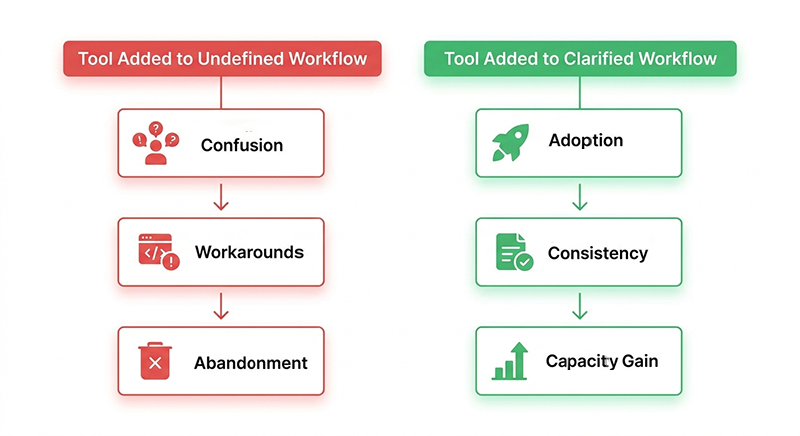
AI tools sit unused in restoration companies for one reason: they were added before the workflows were ready. When teams don't have a clear, defined process for how work moves from intake to closeout, no tool can create that clarity for them. Adoption fails not because people resist change, but because the tool has no clear job to do.

At a Glance

AI adoption fails in restoration not because of employee resistance, but because tools get introduced into workflows that were never clearly defined. A tool without a designated trigger point, a clear owner, and a known output destination will get worked around regardless of how capable it is. The fix isn't a better rollout strategy; it's doing the workflow work before the tool arrives. Clarity precedes adoption, every time.

This pattern is more common than most owners want to admit. The demo looked good. The vendor walked through the features. The team nodded along. Three months later, the software is open on one computer, everyone else routes around it, and the owner is wondering whether the problem is the tool or the people.

It's neither.

The real problem is that the tool landed inside a workflow that was never fully defined. And an undefined workflow doesn't get clearer when you add a new system to it. It gets more complicated.

Understanding why restoration workflows break down before automation enters the picture changes how you think about AI adoption entirely. The question stops being "how do I get my team to use this?" and starts being "is this workflow actually ready for a tool?"

Those are very different questions, and they lead to very different outcomes.

diagram showing why ai tools fail in restoration companies without workflow clarity

The Tool Isn't the Problem

When a restoration owner tells me their team won't use the AI tool they just bought, the first question I ask is: "What workflow was the tool supposed to fit into?" Most of the time, there's a long pause.

That pause is the answer.

What "resistance" usually looks like in restoration companies

A project manager opens the new documentation tool twice, decides it's faster to do it the way she's always done it, and never opens it again.

A field tech downloads the scoping app, uses it on one job, and goes back to texting photos to the office. The owner watches the adoption numbers flatline and starts wondering whether the problem is the technology, the training, or the people.

None of those are the problem.

What's actually happening is that the team was handed a solution to a problem that wasn't clearly defined inside their daily workflow. The documentation tool had no designated trigger point. Nobody knew exactly when to open it, what information to put in, or what happened to the output once it was generated. So they skipped it. That's not resistance. That's the rational response to an unclear process.

A tool without a defined trigger point doesn't get used. It gets worked around.

The difference between a tool problem and a workflow problem

A tool problem looks like this: the software is genuinely difficult to use, the interface doesn't match how restoration work moves, or the output doesn't connect to anything downstream. These problems are real, but they're less common than owners think.

A workflow problem looks like this: nobody can answer the question "at what point in the job does this tool get opened, by whom, and what do they do with the result?" When that question doesn't have a clear answer, the tool sits unused regardless of how good it is.

You can't train your way out of a workflow problem. You can only fix the workflow.

Most owners read the symptom — a tool nobody opens — and conclude they have a people problem. The more accurate diagnosis almost always points somewhere else: to an intake process that was never fully defined, a handoff that nobody owns, or a trigger point that was assumed but never spelled out. The tool just made the gap visible.

 comparison of tool problems versus workflow problems in restoration ai adoption

Three Reasons AI Tools Go Dark in Restoration Operations

Most AI tool failures in restoration aren't dramatic. There's no big announcement, no formal decision to stop using the platform. The tool just quietly stops being part of how work gets done. Understanding why that happens is the first step toward preventing it.

The tool gets added before the workflow exists

This is the most common failure mode, and it usually starts with a demo. The vendor shows a polished walkthrough. The owner sees the time savings. The tool gets purchased, installed, and announced to the team. What doesn't happen first is the harder work: mapping the actual steps of the workflow the tool is supposed to improve, identifying exactly who does what and when, and confirming that the inputs the tool needs will consistently be available.

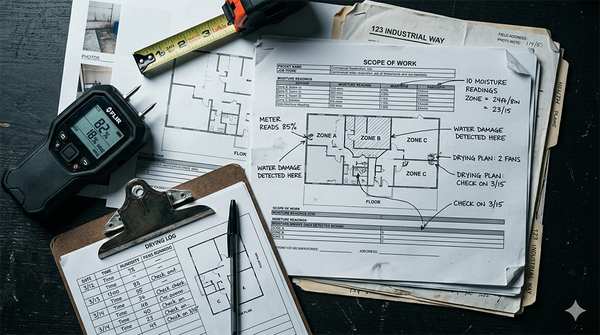
Take documentation assembly as an example. A restoration company buys an AI tool that promises to generate job reports from field notes. The tool works. But field notes aren't standardized. Some techs take them in a notes app, some use texts, some rely on memory and fill in the details back at the office. The AI tool needs structured inputs to produce useful outputs. The workflow never provided them. Three weeks in, the reports are inconsistent, the team stops trusting the output, and the tool gets quietly abandoned.

The tool didn't fail. The workflow did. And the scope writing process in restoration is particularly exposed to this pattern, where documentation tools land before anyone has defined what a complete field data set actually looks like.

Automating an incomplete process doesn't improve it. It just produces incomplete results faster.

Nobody owns the handoff where the tool is supposed to live

Every AI tool in restoration sits inside a handoff: between the field and the office, between the estimator and the project manager, between the PM and the insurance carrier. For the tool to get used, someone has to own the moment when it enters the process.

When that ownership isn't explicitly assigned, the tool becomes everyone's job, which means it becomes nobody's job. A field tech assumes the PM will enter the job data. The PM assumes the tech already did it in the app. The office admin exports the report at closeout and finds half the fields empty. That's not a training problem. That's a handoff problem, and no amount of feature walkthroughs fixes it.

Clear handoff ownership is one of the signals that a workflow is ready for a tool. Until each party knows exactly when their responsibility starts and when it ends, the tool will fall into the gap — the same gap that the cost of workflows built around disconnected systems rather than designed handoffs makes visible at the business level.

The tool solves a problem the team doesn't feel yet

Owners often see the value of a tool before their teams do. The owner has the perspective to connect documentation gaps to payment delays, scope rewrites to lost margin, slow status updates to client churn. The tech running the dehumidifiers on a Category 2 loss doesn't see that chain of consequences. She sees a new app she has to open before she can go home.

This isn't resistance to change. It's a reasonable response to an abstract benefit. The owner knows that better drying logs mean faster carrier payment. The tech knows that opening a new app adds ten minutes to a job that's already running long. Both of those things are true simultaneously.

According to the Cisco AI Readiness Index, roughly 26% of organizations globally report that employees are limited in their willingness to adopt AI or are outright resistant, while nearly 97% say the urgency to deploy AI-powered technologies has increased at their companies.

A 2025 MIT study found that 95% of generative AI pilots in organizations delivered no measurable return, with poor workflow alignment cited as the primary cause, not workforce resistance.

That gap doesn't close through pressure. It closes when teams can see the specific problem the tool solves in their specific part of the workflow, not the owner's view of the problem from the top of the org chart.

What Workflow Clarity Has to Do With It

There's a phrase that gets used a lot when restoration companies talk about AI implementation: "we're not ready yet." Usually it means the owner senses something isn't stable enough to automate, but can't quite name what. That instinct is almost always right. What they're sensing is the absence of workflow clarity.

Workflow clarity isn't a technology concept. It's an operational one. It means your team can answer three questions about any given process without hesitating: who does this, when does it happen, and what does the output look like. When those answers exist and are consistent, a tool has something to work with. When they don't, the tool has nothing to attach to.

What "ready for AI" actually means in a restoration company

"Ready for AI" doesn't mean you have the right software stack. It doesn't mean your team has been through a training program. It means the workflow the tool is supposed to support is already running consistently without the tool.

Take job status updates as an example. If project managers are already updating job status at defined points in the job lifecycle — after initial assessment, after demo, after drying is complete — and that information is landing in a consistent place, then automating a status notification to the carrier or the property owner is straightforward. The tool just does faster what the team already does reliably.

If status updates are inconsistent — sometimes after demo, sometimes after the adjuster calls, sometimes never — then an automation tool doesn't fix the inconsistency. It automates the chaos. You get faster, more consistent evidence that the workflow was never defined in the first place.

This is exactly what workflow clarity in restoration operations is designed to address before any tool enters the picture.

Workflow clarity doesn't make AI optional. It makes AI functional.

The signal that tells you a workflow is ready for a tool

The most reliable signal is whether a new hire could follow the process without asking questions. Not a senior PM who knows the unwritten rules. A new hire on their second week.

If the answer is no — if the process only works because certain people already know how it works — then the workflow lives in people's heads, not in a defined system. That's not a tool problem. That's a documentation problem that sits upstream of any technology decision.

When a restoration company can hand a new field tech a scope checklist and know that the output will be consistent regardless of job size or loss type, that's a workflow that's ready for a tool. When consistency depends on who's running the job, the tool will inherit that inconsistency and make it harder to see.

Ready to find out whether your workflows are ready for the tools you want to add? The Restoration Growth Blueprint is a structured operational audit that identifies exactly where your processes are defined, where they depend on tribal knowledge, and where a tool would land on solid ground versus uncertain footing.

checklist showing when a restoration workflow is ready for ai tool implementation

How to Actually Get a Tool Used

The practical question isn't "how do I get my team on board with AI?" It's more specific than that: which workflow goes first, what does the tool need to function inside it, and how do you make using it the easier path rather than the extra step?

Those three questions have answers. Here's how to work through them.

Start with one workflow, not one tool

The instinct when investing in new software is to get everyone using it everywhere as fast as possible. That instinct works against adoption. A tool introduced across the entire operation simultaneously gives the team too many new variables to sort out at once. Nobody knows where the problems are coming from. Feedback is noisy. And when it doesn't stick, it's hard to diagnose why.

A better approach is to pick one workflow and one team before the tool goes anywhere else. In restoration, the strongest candidates are workflows that already have a defined sequence, a clear owner, and a consistent trigger point.

Daily drying log completion on active water losses is a good example. The trigger is consistent (end of each monitoring visit), the owner is clear (the field tech on that job), and the output has a known destination (the job file, the carrier communication log). A tool that slots into that workflow has something solid to attach to.

Once it works there, the team has proof. That proof travels faster than any training rollout.

Define the job before you introduce the solution

Before a tool gets introduced to a team, one question needs a written answer: what does this tool do, at what point in the workflow, and who is responsible for it?

Not a general answer. A specific one.

"The scoping tool gets opened at the start of every on-site assessment, by the PM or lead tech, and the output gets attached to the job file before the estimator touches it" is a job definition. "Use the scoping tool when you're on site" is not. The first gives the team a clear action with a clear trigger. The second leaves room for interpretation, and interpretation is where inconsistency starts.

This is why how AI actually works inside a clarified restoration workflow looks different from how it works in a chaotic one. The tool is identical. The workflow it lands in is not.

The problem isn't effort. It's the absence of a defined trigger that tells each party when their responsibility starts and when it ends.

Make the tool the path of least resistance

The fastest way to kill adoption is to make the new tool harder to use than whatever people were doing before. That sounds obvious, but it happens constantly in restoration companies. The old way was a text to the office with a photo. The new way requires opening an app, logging in, selecting the job from a list, filling in several fields, and uploading the same photo. The output is better. The experience is worse. People go back to the text.

Before rollout, map the current steps in the workflow and count them. Then map the steps the tool requires and count those. If the tool adds friction without removing a bigger source of friction downstream, the adoption math doesn't work yet. Either the tool needs better configuration, or the workflow upstream of it needs to be simplified first.

When the tool genuinely makes a step easier — the drying log fills in automatically from sensor data, the scope narrative generates from a voice walkthrough, the job status updates without a manual entry — people use it without being asked. The goal isn't compliance with a new system. It's making the new system the obvious choice.

Frequently Asked Questions About AI Tool Adoption in Restoration Companies


Why don't restoration employees use AI tools after they're introduced?

The most common reason is that the tool was introduced without a defined place in the workflow. When a team member can't answer "when exactly am I supposed to open this, and what do I do with the result," they default to whatever they were doing before. That's not resistance — it's the rational response to an unclear process.

A secondary reason is that the tool adds steps without visibly removing a bigger problem. If using the AI app takes longer than the old method from the field tech's perspective, adoption stalls regardless of how valuable the output is to someone in the office. The person doing the extra work needs to feel the benefit, not just the owner reviewing the reports.

The fix isn't more training on the tool. It's defining the trigger point, the owner, and the output destination before the tool gets introduced.


What's the right order for introducing AI into a restoration workflow?

Map the workflow before you select the tool. Identify the specific process you want to improve, confirm it's already running consistently without automation, and define who owns each step. Then introduce the tool into that defined process as a mechanism, not a replacement for the process itself.

In practice, that sequence looks like this: pick one workflow, document how it currently runs, identify where the friction is, select a tool that addresses that specific friction, define the trigger point and handoff ownership, and run it with one team before expanding.

Companies that skip the mapping step and go straight to the tool almost always end up back at the beginning six months later, looking for a different tool to solve the same problem.

The Complete Guide to Restoration Workflow Clarity covers this mapping process in detail.


How do you know if your workflows are ready for AI?

The most reliable test is whether a new hire could follow the process consistently without asking questions. If the workflow only runs well because certain experienced people know the unwritten rules, the process lives in people's heads rather than in a defined system. That's not a workflow that's ready for a tool.

A workflow that's ready for AI has three characteristics: a consistent trigger point that tells the team when the process starts, a defined owner for each step, and a predictable output that lands in a known place. When those three things are true, a tool has something solid to attach to. When they're missing, the tool inherits the inconsistency and makes it harder to diagnose.

If you're unsure where your workflows stand, the Restoration Growth Blueprint is a structured audit designed to answer exactly that question.

The Bottom Line

AI tools don't fail in restoration companies because the technology is wrong or the team is resistant. They fail because they land in workflows that were never defined clearly enough to hold them. The fix isn't a better tool or a more persuasive rollout. It's doing the workflow work first.

Pick one process. Define the trigger, the owner, and the output. Confirm it runs consistently without the tool. Then introduce the tool into that clarity, not instead of it. That sequence sounds slower than just buying and deploying, but it's the only one that actually produces adoption.

The companies that get lasting value from AI don't have better technology than the ones that don't. They have better workflows underneath it.

Getting AI to Work in Your Restoration Company Starts Before the Tool

The restoration companies that get lasting adoption from AI tools don't have a better technology budget or a more tech-savvy team. They did something first that most companies skip: they got clear on how work actually moves before they tried to automate it.

That sequence matters more than the tool selection. More than the training program. More than which platform you choose or which vendor makes the best pitch. Building the right AI implementation sequence, workflow first, platform second, automation third, is what separates companies that get lasting adoption from those that cycle through tools looking for the one that finally sticks.

A tool introduced into a clearly defined, consistently executed workflow gets used. A tool introduced into a process that lives in people's heads gets worked around.

If your team isn't using the tools you've invested in, the honest first question isn't "what are we doing wrong with the rollout?" It's "what does the workflow actually look like right now, and is it stable enough to hold a tool?"

Workflow clarity in restoration operations isn't a prerequisite that slows you down. It's the work that makes everything else faster.

Not Sure Where AI Fits in Your Operations? If you’re unsure whether your workflows are ready for structured AI adoption, start with clarity, not tools.

BOOK FREE AI CLARITY CALL

Share this article

Share to Facebook
Share to X
Share to LinkedIn

Written by

Jim West
Jim West
Jim West is a digital operations specialist and MIT-certified AI strategist who helps restoration companies identify where time, margin, and energy are lost in daily operations. He helps teams simplify systems and work with less friction.
https://workwonders.ai/

Join the conversation