How to Build an AI Implementation Strategy for Your Restoration Operation
Most restoration companies aren't failing at AI adoption. They're succeeding at adopting it in the wrong places. Here's what AI implementation actually looks like across a restoration operation and the sequence that determines whether it works.
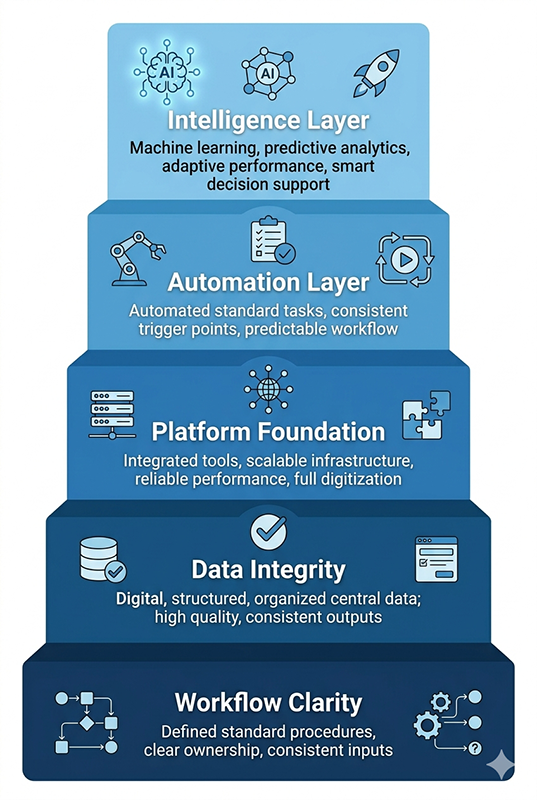
An AI implementation strategy for restoration operations is a sequenced plan that establishes workflow clarity, data integrity, and platform foundation before any automation is deployed. Restoration companies that implement AI without this sequence automate broken processes, not fixed ones.
What You Need to Know
Nearly half of field service businesses are experimenting with AI today, but most are using it for marketing and social media, not operations. In restoration, that gap matters because the workflows that drive revenue — scoping, documentation, estimating, insurance communication — are exactly where AI can remove friction and protect margin. But those workflows have to be clear before any tool touches them. This guide covers what AI implementation actually looks like across a restoration operation, what has to be true before automation is applied, and how to sequence the work so it compounds instead of collapses.
The restoration industry doesn't lack for AI tools.
It lacks for AI results.
Walk into most restoration companies today and you'll find owners who've bought software, signed up for platforms, and sat through demos. Some of it is running. Some of it isn't. And almost none of it is delivering the margin protection or time savings they were sold on.
That isn't a technology problem. It's a sequencing problem.
The companies getting real returns from AI in restoration aren't the ones who found the best tools. They're the ones who did something unglamorous first: they got clear on how their operation actually works before they tried to automate any of it.
They mapped their intake process, documented their handoffs, standardized what their field techs capture on site, and identified exactly where time and margin were bleeding out. Then they built.
That sequencing is what this post is about. Not which tools to buy. That's a different conversation, and one that makes more sense after this one. This is about what workflow clarity looks like in a restoration operation, why it has to come first, and how to build an AI implementation strategy that actually fits the way restoration work moves.
If you're running a water, fire, or mold operation and you're wondering why the AI tools you've added haven't changed much, or you're trying to figure out where to start before making another investment, this is the right place to begin.
Why Most Restoration AI Projects Fail Before They Produce Results
The field service industry is in the middle of a genuine AI adoption wave. According to KnowHow's 2025 State of the Industry Pulse Check, nearly half of trade service businesses are now experimenting with artificial intelligence. Most are using it to write social media posts and polish marketing emails.
Those aren't bad applications. But they're not operational ones. And in restoration, the work that drives revenue and protects margin happens in operations: how a loss is documented, how a scope is written, how a supplement gets defended, how a job moves from mitigation close to reconstruction start without losing two weeks in the handoff. That's where the money lives. That's also where most AI projects never reach.
Most restoration companies aren't failing at AI adoption. They're succeeding at adopting AI in the wrong places.
The Tool-First Trap
The most common AI implementation failure in restoration doesn't start with a bad tool. It starts with a reasonable decision made in the wrong order.
An owner sees a demo. The product looks capable. The vendor has a restoration use case or two. The owner signs up, assigns someone to get it running, and waits for the results to show up in the numbers.
They don't. Or they do for a while, then plateau. Or they create new problems while solving the old ones.
What happened isn't that the tool was bad. What happened is that the tool was installed on top of a workflow that was never clearly defined. The AI learned to execute the process that was already there. And the process that was already there had gaps in it. Inconsistent intake fields. Field documentation that varied by technician. Handoff triggers that lived in someone's head rather than in a system.

The tool didn't fix those gaps. It faithfully reproduced them, faster.
This is the tool-first trap. It's not unique to restoration, but restoration's documentation requirements make it especially costly here.
A Category 3 sewage loss with inconsistent field notes doesn't produce a better scope when AI touches it. It produces a faster scope with the same missing line items, and now the estimator has less reason to question it because it looks complete.
What Automating the Wrong Things Actually Costs
The financial cost of tool-first implementation isn't always visible in a single line item. It shows up in scope rewrites that still happen, just downstream from a different step. It shows up in adjuster pushback on documentation that was generated confidently but wasn't grounded in the field conditions that actually existed. It shows up in supplements that should have been captured in the original scope but weren't, because the AI was working from incomplete field data.
For a restoration company running 150 to 200 jobs per year, those leaks compound. A missed line item on a water loss is a rounding error. The same pattern repeated across 40 jobs in a quarter is a margin problem that looks like a carrier problem.
The actual cost of automating the wrong things isn't the tool investment. It's the opportunity cost of having deployed resources against a problem that wasn't diagnosed correctly first.
What AI-Ready Actually Means in a Restoration Operation
The phrase "AI-ready" gets used a lot in vendor marketing. It usually means "compatible with our platform." That's not what it means here.
In a restoration operation, AI-ready describes a specific set of conditions. It's not a technology state. It's an operational state. And it has three components that have to be present before any automation layer is worth building on top of them.
Workflow Clarity as a Prerequisite
Workflow clarity in restoration means that the people running your operation can describe, in writing, exactly what happens at each stage of a job: who is responsible for what, what information needs to exist before the next step can start, and what the trigger is that moves work from one phase to the next.
That sounds basic. In practice, most restoration companies at the $1M to $5M revenue range are running on a combination of institutional memory, tribal knowledge, and the judgment of their best project manager. The work gets done. Jobs close. But the process lives in people's heads, not in a documented system.
That's not a criticism. It's how most restoration businesses are built. The owner figures out what works, builds a team that learns to execute it, and the operation scales on the backs of capable people. The problem surfaces when AI enters the picture, because AI has no access to institutional memory. It works from what's documented and captured, not from what the best PM knows.
The Complete Guide to Restoration Workflow Clarity covers this in depth. The short version for the purposes of this post: before any AI tool is deployed in your operation, you need to be able to describe your intake-to-closeout workflow in writing, without asking your best person. If you can't, that's the first thing to fix. Not the last.
Clarity precedes automation. Every time.
Data Quality and Capture Consistency
AI is downstream from data. That relationship is not negotiable.
If your field techs are documenting Category and Class inconsistently across jobs, if moisture readings aren't being logged in a standardized format, if intake captures different information depending on who answers the phone, the AI you layer on top of that data will reflect those inconsistencies. It won't correct them. It will work with them confidently, which is worse.
The variance problem in restoration is well-documented at the industry level. As C&R Magazine has covered in its operational reporting, restoration companies running multiple teams or locations often find that the same loss type produces dramatically different documentation depending on who ran the job. That variance might be manageable when a human reviewer catches it before the file goes to the adjuster. It becomes a structural problem when AI is generating documentation at volume from inconsistent field inputs.
The question to ask before you connect any AI tool to your field data is simple: does every technician capture the same information, the same way, on every job? If the answer is no, or "mostly," or "it depends on the tech," the data foundation isn't ready. Building on top of it will accelerate variance, not resolve it.
Platform Foundation
The third readiness condition is the one most companies assume they already have.
Most restoration operations are running some combination of a job management platform, an estimating tool, an accounting system, and a communication layer. The platforms themselves are usually capable. The problem is that they're running independently. Data gets entered in one system, re-entered in another, and a third system never sees it at all. The owner wants a picture of job-level profitability and has to pull reports from three places to build it.
That disconnection isn't an AI problem. It's a workflow architecture problem. But it becomes an AI problem the moment someone tries to deploy automation or intelligence on top of it, because the systems aren't speaking to each other. The automation has no unified data source to draw from. The intelligence layer has no complete picture to analyze.
The Hidden Cost of Running Your Restoration Business Across Disconnected Systemscovers the operational and financial cost of this pattern in detail. The relevant point here is sequencing: getting your core platforms connected and your data flowing in one direction is infrastructure work that has to happen before the AI layer is worth building. It's not glamorous. It doesn't feel like innovation. But it's the work that makes everything else possible.
The restoration companies that have gotten the most out of AI implementation are the ones that treated this step seriously. Two operations audited as part of the research for this post both had capable technology stacks. Both were running Xactimate, a job management platform, and QuickBooks independently.
Both operations had duplicate data entry built into their daily workflow. Both chose to establish a connected operational core first. The AI agents they built afterward worked because the data those agents depended on was finally clean, consistent, and accessible in one place.
Where AI Actually Moves the Needle Across Restoration Workflows
Assuming the three readiness conditions are in place, the next question is where to apply AI across the job lifecycle. Not every workflow benefits equally. Some applications produce durable operational value. Others produce surface-level efficiency that looks good in a demo and doesn't change much in practice.
What follows is an honest map of where AI moves the needle in restoration, organized by workflow stage. Platform-specific implementations — how Microsoft 365, Google Workspace, or a dedicated restoration platform executes each of these — are covered in the Practical AI pillar on this site. This section focuses on the workflow problems being solved, not the tools solving them.
Intake and First Notice of Loss
Intake is the first place data quality either gets established or gets compromised. Everything downstream — scope quality, estimate accuracy, insurance communication — depends on what gets captured in the first few minutes of a loss.
AI applications at intake are well-suited to this stage because the tasks are structured and repetitive. Voice-to-text transcription captures first notice of loss (FNOL) details without requiring a dispatcher to type while they listen. Automated triage logic can classify loss type, flag urgency, and route the job to the right workflow based on what was captured. Follow-up reminders prevent leads from going cold when the team is busy on active jobs.
The constraint is the same one that applies everywhere: the AI is working from what gets said and captured. If the intake process doesn't have defined required fields, voice transcription produces a transcript, not a structured job record. The tool needs the process to be defined before it can execute it consistently.
Scoping and Field Documentation
This is the most technically demanding AI application in restoration, and the one with the highest ceiling for both value and risk.
The value case is real. A field technician who can walk a Category 2 water loss, narrate findings room by room into a voice recorder, and have a structured scope draft waiting when they get back to the truck is a meaningfully more productive technician than one who writes everything up by hand after the fact.
AI-assisted scope generation, when it's grounded in IICRC S500 water damage restoration standards and built on clean field inputs, produces first drafts that require less rewriting and miss fewer line items than manual scopes written under time pressure.
The risk is equally real. A scope draft is not a finished scope. The field conditions that matter most to an adjuster — the moisture readings that justify the drying timeline, the Category determination that drives the line item choices, the hazard flags that explain why additional protocols were required — have to come from the technician's actual assessment, not from an AI filling in what seems likely based on similar jobs. Human review before submission isn't optional. It's the step that makes the rest of the process defensible.
The companies getting the most out of AI-assisted scoping are the ones who treated it as a documentation acceleration tool, not a documentation replacement tool.
This is where most restoration operations have the clearest ROI case for AI, and also where the most damage gets done when the wrong tools are used.
The opportunity is significant. A restoration company running 150 to 200 jobs per year, with an average job value of $8,000 to $12,000, that recovers even a modest percentage of consistently missed line items through better estimate review is looking at meaningful annual revenue recovery.
AI tools built specifically for Xactimate-based estimating workflows can flag line items that are commonly missed for a given loss type, identify scope-to-estimate discrepancies, and surface supplement opportunities that would otherwise require a senior estimator's review to catch.
The insurance communication side is equally valuable when done correctly. AI-drafted adjuster responses grounded in IICRC standards and supported by the documentation in the job file are faster to produce and more consistent than responses written from scratch under deadline pressure.
The key word is "grounded." A generic language model drafting adjuster responses without restoration-specific context produces responses that sound professional but lack the technical specificity that actually defends a disputed scope. The tool has to know what S500 says about Category 3 drying timelines before it can defend them credibly.
Job Management and Coordination
Once a job is in progress, AI's role shifts from documentation generation to coordination and visibility.
Automated status updates triggered by milestone completion replace the manual check-in cycle that consumes PM time on every active job. Drying log reminders ensure daily psychrometric documentation happens on schedule rather than getting reconstructed from memory at job close.
Handoff triggers between mitigation and reconstruction phases — which are consistently one of the most expensive coordination failures in restoration operations — can be automated once the handoff conditions are defined clearly enough for a system to recognize them.
This is the layer where the three-layer architecture of data capture, data movement, and data visibility connects into a functioning operational system. How AI Workflow Automation Actually Works Inside Restoration Operations covers that architecture in detail, including how the platform paths for Microsoft 365, Google Workspace, and dedicated restoration platforms each approach this layer differently, and where the intelligence layer sits above all of them.
Reporting and Business Intelligence
The intelligence layer is the last thing to build, which is why it's listed last here rather than first.
Most restoration owners are running their business from a high-level picture: overall revenue, rough gross margin, payment aging. They know roughly how the business is doing. They don't know which job types are actually profitable after labor and equipment costs, which referral sources produce the highest-value work, or how their cash position will look in 60 days given current open receivables and typical payout timelines.
That visibility is what business intelligence provides. When job management data, estimating data, and accounting data are flowing into a connected system, AI can surface the patterns that aren't visible when those systems are separate. Which adjuster relationships are creating the most friction and the longest payout cycles. Which job types have the best margin after direct costs. Where the operation is carrying capacity that isn't converting to revenue.
This isn't a tool problem. It's a data availability problem. The intelligence layer only works when the platform foundation beneath it is connected and the data flowing through it is clean. Which is why it comes last in the sequence, not first.
The Readiness Assessment — Five Questions Before You Implement Anything
The gap between restoration companies that get results from AI and those that don't usually isn't visible in their technology stack. Both groups often have similar tools. The difference shows up when you ask them five specific questions about how their operation actually works.
Work through these honestly. The answers will tell you more about your AI readiness than any vendor assessment will.
Can you describe your intake-to-closeout workflow in writing, without asking your best project manager?
If the answer is no, your workflow exists as institutional memory, not as a documented system. That's a common state for restoration companies that have grown by hiring capable people and trusting them to figure out what works. The operation runs. But it runs on people, not on process.
When AI is introduced into a people-dependent workflow, it either gets ignored because there's no defined place to insert it, or it gets used inconsistently because each PM uses it differently. Document the workflow before you deploy the tool.
Do your field technicians capture the same information the same way on every job?
Not roughly the same. The same. If a Category 1 water loss in a 900-square-foot kitchen produces a different field documentation package depending on which technician ran the job, your data layer is inconsistent.
AI tools that generate scopes, flag line items, or produce documentation summaries from field data are working from whatever that data contains. Variance in inputs produces variance in outputs. Standardizing field capture protocols isn't an AI project. It's a prerequisite for one.
Does your operational data live in one place, or in six?
Count your systems: job management platform, estimating tool, accounting software, field documentation app, communication channel, photo documentation tool. Now ask how many of those are connected to each other in a way that moves data automatically. If the answer is one or two, or none, your data is fragmented across platforms that don't share a common record.
An AI that can only see part of the picture will give you analysis based on part of the picture. The integration work that connects those systems is infrastructure, not automation. It has to come first.
Do you know your actual margin by job type, or only your overall gross margin?
This question reveals whether your financial visibility is good enough to support intelligent decision-making. If you know your overall gross margin but not whether water mitigation at Category 2 is more profitable than mold remediation after direct labor and equipment costs, you're managing the business by aggregate rather than by signal.
AI-driven business intelligence is built on job-level data. If that data isn't being captured and connected to your financial system, the intelligence layer has nothing to analyze.
Have you identified the single most expensive manual process in your operation?
Not the most annoying one. The most expensive one, measured in time, margin, or both. For most restoration companies, the answer is somewhere in insurance communication, estimating, or field-to-office handoffs. The point of this question isn't to produce an answer. It's to determine whether your leadership team has done the operational diagnosis necessary to deploy AI where it will actually change a number, rather than where it seems like a natural fit for technology.
If you can't answer question one, no AI tool will answer the others for you.
These questions aren't a scorecard. There's no passing threshold. They're a diagnostic tool, and the honest answers tell you exactly where to focus before you make another tool investment.
If your answers revealed gaps in more than two of these areas, you're not behind on AI adoption. You're ahead of most restoration companies. Most haven't done this diagnostic at all.
Not sure where your operation lands on these questions? The Restoration Growth Blueprint is a structured operational audit for restoration companies that want to understand where friction lives before deciding what to fix.
How to Sequence the Work
The readiness assessment in the previous section is diagnostic. This section is prescriptive. It answers the question that follows naturally from the diagnosis: once you know what's missing, what order do you build it in?
The sequence matters more than most owners expect. Each layer creates the conditions the next layer needs. Skipping a layer doesn't save time. It creates rework, usually after a tool investment has already been made.
Start With Workflow Documentation, Not Tool Selection
The first step in any honest AI implementation strategy is writing down how work actually moves through your operation right now. Not how it's supposed to move. How it actually moves.
That means tracing a job from the moment the phone rings to the moment the file closes. Every decision point. Every handoff. Every place where work sits and waits because a required input hasn't arrived yet. Every place where the same question gets asked twice because the answer wasn't captured the first time.
This exercise is uncomfortable for most restoration owners because it surfaces problems they've been managing around rather than solving. A PM who's been compensating for an incomplete intake process. An estimator who's been rebuilding field data from scratch because the techs don't log it consistently. An admin who's been manually transferring job details between systems because the platforms don't talk to each other.
Those compensations are invisible cost centers. They're also the exact locations where AI will either create value or create faster versions of the same problem. Document the workflow before you select the tool. The documentation will tell you what the tool actually needs to do.
Build Data Capture Consistency Before You Connect Systems
Once the workflow is documented, the gaps in data capture become visible. Field technicians logging different information. Intake fields that aren't required. Moisture readings recorded in inconsistent formats. Category and Class determinations that live in verbal communication rather than in the job record.
Standardizing those inputs is unglamorous work. It involves updating field checklists, retraining technicians, and enforcing capture requirements that feel like bureaucracy until the downstream value of consistent data becomes visible. But it's the work that makes everything else reliable.
A connected system built on inconsistent inputs produces inconsistent outputs at scale. Standardize what gets captured before you build the connections that move it.
Add the Operational Platform Core Before You Add Intelligence
With documented workflows and consistent data capture in place, the platform layer becomes straightforward rather than speculative. You know what data needs to flow where. You know which systems need to speak to each other. You know what a connected job record looks like because you've documented the workflow it needs to support.
This is where the platform decision gets made: whether that's a dedicated restoration platform that handles job management, documentation, and estimating in one environment, or a connected stack built around existing tools. The right answer depends on the operation. What matters is that the platform core is in place and data is moving through it cleanly before any automation or intelligence is layered on top.
Two restoration operations audited in the process of developing this content illustrate the point. Both were running capable technology stacks. Both had Xactimate, a job management platform, and QuickBooks operating independently.
One was a Google Workspace-based operation. One was running Microsoft 365. Different sizes, different markets, different team structures. Both arrived at the same conclusion after the audit: the platform foundation had to be consolidated before the AI work could start. Both chose a dedicated restoration platform as the operational core. The automation and intelligence layers they built afterward worked because the data those systems depended on was finally accessible in one place.
Both companies had the tools. Neither had the sequence. And for both, once the platform foundation was in place, which AI tool actually fits which restoration workflow became a much cleaner decision because the workflow itself defined what each tool needed to do.
Layer in Automation After the Foundation Is Stable
Automation in this context means the rules-based work: triggers, reminders, status updates, handoff notifications, follow-up sequences. The things that happen the same way every time a defined condition is met.
This is the layer where time savings become visible quickly. Automated drying log reminders that go out every 24 hours without a PM having to set them. Status update messages to property owners that trigger when a milestone is completed rather than when someone remembers to send them. Handoff notifications between mitigation and reconstruction that fire when the mitigation close checklist is complete rather than when someone makes a phone call.
None of this requires sophisticated AI. It requires documented workflows, consistent data, and a connected platform that can recognize when a condition has been met. The automation layer is where the foundation work pays off in daily operational time.
Add the Intelligence Layer Last, Not First
The intelligence layer is the most compelling part of the AI story in restoration: a system that analyzes your job data, surfaces your most profitable work types, flags your highest-friction carrier relationships, and tells you what your cash position will look like in 90 days based on current open receivables and historical payout timelines.
That system is real. It's being built inside restoration operations today. But it requires everything beneath it to be functioning first. Clean data. Connected platforms. Documented workflows. Consistent field capture. If those foundations aren't in place, the intelligence layer has nothing reliable to analyze.
This is the most common sequencing error in restoration AI implementation: owners who want to start with the dashboard and the insights, before the data feeding those insights is trustworthy. The intelligence layer isn't where you begin. It's what you get to when the work beneath it is done correctly.
Frequently Asked Questions About AI Implementation in Restoration
What does AI implementation mean for a restoration company?
AI implementation in a restoration company means deploying artificial intelligence tools inside specific operational workflows to reduce manual work, improve documentation quality, and increase visibility across the job lifecycle. It is not a single product or platform. It is a sequenced process that begins with workflow documentation and data standardization, moves through platform integration, and builds toward automation and intelligence layers that compound over time.
For most restoration operations, the highest-value applications are in scoping and field documentation, estimating and insurance communication, job coordination, and business intelligence reporting.
How is AI implementation in restoration different from other industries?
Restoration operates under documentation requirements that most industries don't face. Every scope has to be defensible to an insurance adjuster. Every drying timeline has to be grounded in IICRC standards and supported by daily psychrometric logs. Every Category and Class determination drives line item choices that directly affect what the carrier pays. That compliance burden means AI tools used in restoration can't be generic.
A language model that drafts adjuster responses without being grounded in S500 protocols, or a scope generator that doesn't understand the difference between a Category 2 and Category 3 loss, produces output that looks complete but creates downstream liability.
Restoration-specific AI implementation requires tools and prompts that are built around how this industry actually documents and defends its work.
What should a restoration company do before implementing AI?
Three things, in this order. First, document the workflow from intake to closeout clearly enough that a new hire could follow it without asking a senior PM for clarification.
Second, standardize what field technicians capture on every job so the data flowing into any AI tool is consistent across the operation.
Third, ensure the core operational platforms are connected and sharing data rather than operating as independent silos. AI implementation that skips these steps doesn't fail because the tools are bad. It fails because the foundation the tools depend on isn't ready.
Which restoration workflows benefit most from AI?
Based on operational audit data across restoration companies of varying sizes, the highest-ROI applications are estimating and insurance communication, followed by scoping and field documentation, followed by job coordination and status management.
Estimating produces the clearest financial return because the revenue recovery from consistently caught line items and supplements is measurable against a baseline.
Scoping produces the largest time savings for field and office staff when voice-to-scope tools are used correctly.
Job coordination produces the most visible daily operational improvement because the manual check-in and status update cycles that consume PM time are the easiest processes to automate once workflows are documented and platforms are connected.
How long does it take to see results from AI implementation in restoration?
It depends on which layer is being implemented and how much foundation work was required first. Automation-layer changes, such as automated status updates, drying log reminders, and handoff triggers, produce visible time savings within the first few weeks of deployment.
Documentation tools like AI-assisted scoping show meaningful improvement within the first month, though the full benefit requires technician adoption of standardized field capture protocols.
Business intelligence and reporting visibility typically requires 60 to 90 days after platform integration is complete before the data set is large enough to surface reliable patterns.
The foundation work — documenting workflows, standardizing data capture, and connecting platforms — can take anywhere from 30 to 90 days depending on the current state of the operation and the pace of implementation.
Is AI implementation realistic for smaller restoration companies?
Yes, with an important qualification. The sequence described in this post applies at any revenue level.
A $1M restoration operation and a $5M restoration operation face the same foundational requirements: documented workflows, consistent data capture, connected platforms. The difference is that a smaller operation typically has fewer systems to connect, fewer people whose habits need to change, and less institutional complexity to navigate. That makes the foundation work faster, not harder. The tools themselves are also accessible at smaller scale.
Voice-to-scope tools, AI-assisted estimate review, and automated job coordination don't require enterprise budgets. What they require is the same thing they require at any size: a foundation that makes them useful.
The Bottom Line on AI Implementation in Restoration
AI implementation in restoration isn't complicated. It's sequential. The companies getting durable results from it aren't running more sophisticated tools than everyone else. They're running those tools on top of a foundation that was built in the right order: documented workflows first, consistent data capture second, connected platforms third, automation fourth, and intelligence last.
Every step in that sequence depends on the one beneath it. Skipping ahead produces faster versions of existing problems, not solutions to them. And the foundation work, while unglamorous, is the part that determines whether the tools you invest in actually change anything.
The restoration industry is at an early stage of this transition. Most operations are still in the experimentation phase, testing tools at the edges of their workflows without having addressed the operational conditions that would make those tools work across the entire operation. The companies that do the foundation work now will have a compounding advantage over the ones that try to shortcut it later.
Start with the workflow. Everything else follows from there.
The Sequence Is the Strategy
Most conversations about AI in restoration start with tools. Which platform. Which features. Which vendor has the best restoration use case. Those are reasonable questions, but they're the wrong questions to start with.
The right question is simpler: is your operation ready for what you're about to ask AI to do?
Not ready in a technology sense. Ready in an operational sense. Documented workflows. Consistent field data. Connected platforms. A clear picture of where time and margin are actually going. Those conditions aren't prerequisites that slow down AI adoption. They're the work that makes AI adoption worth doing.
The restoration companies that have built this foundation and then layered AI on top of it are operating differently than the ones still trying to shortcut the sequence. Their scopes are more complete. Their supplements get caught before the file closes rather than after the adjuster pushes back. Their owners are reading job-level profitability reports instead of estimating gross margin from memory. Their project managers are spending less time on coordination and more time on the work that actually requires their judgment.
That's what AI implementation looks like when the sequence is right. It doesn't announce itself. It shows up quietly in the numbers, in the hours recovered, and in the jobs that close cleaner than they used to.
The Practical AI pillar on this site covers the specific platforms, architectures, and implementation paths in depth. The Workflow Clarity cornerstone is the right place to start if the foundation work described in this post is where your operation needs to focus first. And if you want a clear-eyed assessment of exactly where your operation stands and what to build in what order, that's what the strategy call is for.
Not Sure Where AI Fits in Your Operations? If you’re unsure whether your workflows are ready for structured AI adoption, start with clarity, not tools.
Jim West is a digital operations specialist and MIT-certified AI strategist who helps restoration companies identify where time, margin, and energy are lost in daily operations. He helps teams simplify systems and work with less friction.